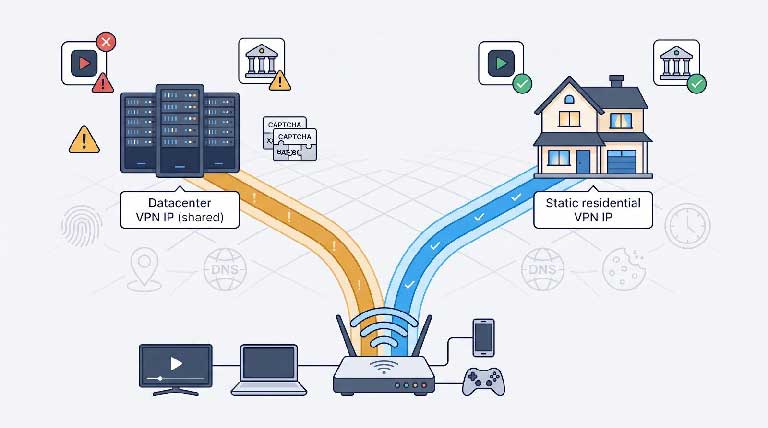
Shared VPN IPs shout “server farm.” Streaming apps boot you, banks double-check logins, and CAPTCHA walls stack up. Switch to a residential, static, dedicated IP and most of those hassles fade because every device now looks like it’s under one household.
That fix isn’t foolproof. Fraud engines already fuse GPS, DNS, device fingerprints, and timing cues to spot spoofing with 99 percent accuracy (GeoComply, 2026). In a 2025-26 audit of 129 000 real sessions, IPv6 leaks slipped past 12 “safe” VPNs in at least 5 percent of cases (arXiv).
We tested 12 VPNs on July 29, 2026—seven genuine or claimed residential services and five datacenter fallbacks.
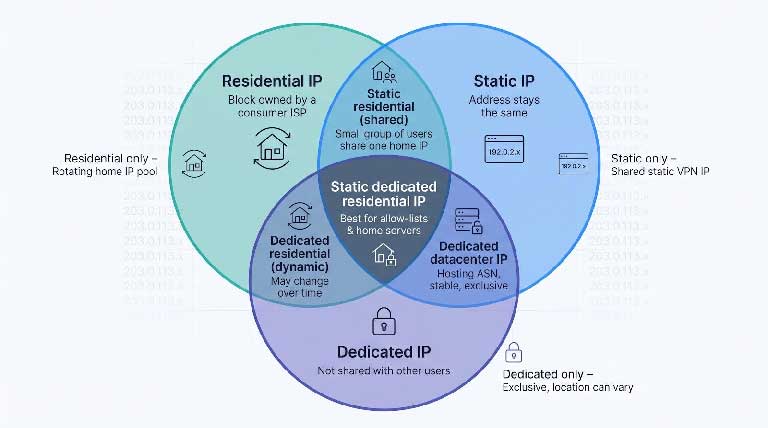
Marketers often blur three separate promises:
Picture three overlapping circles. Some services cover all three, others only one. Knowing where a product lands helps you avoid paying datacenter fees for a thin “residential” label. Keep this frame in mind as we compare providers.
Our scorecard is public and weighted. You can replicate every step.
| Criterion | Weight | What we checked |
|---|---|---|
| Residential authenticity | 22 % | ASN traces back to a consumer ISP |
| Security & privacy | 16 % | Independent audits, tokenised IP delivery, logging claims |
| Protocols & likely speed | 12 % | WireGuard on the same residential or dedicated server, recent performance tests |
| Block / CAPTCHA resistance | 10 % | Community reports plus multi-signal detection (device, GPS, DNS, timing) |
| Price, coverage, router setup, support, extras | 40 % | Total cost after promos, city list, router files, port forwarding, customer service |
We subtract points when claims are not reproducible. A 2025–26 study of 129 000 VPN sessions found native IPv6 leaks in more than 5 percent of users on 12 services once thought safe; any provider that still fails that check loses marks.
Advertising never affects placement. A banner buy is a banner, nothing more.
TorGuard bundles a static, dedicated address that lives on a U.S. residential ISP block. You can download WireGuard or OpenVPN files for routers and travel boxes, and port forwarding comes included, which is handy for Plex, Home-Assistant, or a small Minecraft realm.
Cost is straightforward: $39.99 per month covers both the VPN plan and the residential IP. No add-on fees and no coupon gymnastics.
Where it falls short: the residential list is small (a few U.S. cities), some older blog posts list locations that have since vanished, and the last full no-logs audit predates this product. TorGuard also operates from Florida, placing it under U.S. jurisdiction. Use the seven-day refund window to verify the ASN, run IPv6 and DNS leak tests, and keep screenshots before you point your home network at the new address.
Windscribe spreads each residential address across fewer than ten users, so you enjoy a fixed location with a light privacy buffer from the small group. Choose Chicago, Dallas, or Toronto at checkout, add the Static Residential bolt-on, and the dashboard unlocks WireGuard, OpenVPN, and IKEv2 files. Permanent port forwarding is included; it is useful for a Synology box or self-hosted photo gallery.
Pricing is clear: the add-on costs $96 per year, and you still need Windscribe’s unlimited-data plan, bringing the total to about $9 per month. That beats most verified residential competitors.
Trade-offs: the bolt-on is sold only yearly, P2P traffic is blocked, and the city list is short. For many homes, though, the blend of real ISP routing, router-ready configs, and lower cost feels like a practical middle ground.
If you need more than one U.S. address, StarVPN is built for that use case. The Business Residential tier offers static IPs in at least six countries, while the Premium Residential plan reaches smaller European markets many rivals skip.
On the tech side, you get WireGuard, OpenVPN, and Star’s AmneziaWG obfuscation for restrictive networks. SOCKS5 and HTTP proxy ports are included for single-app tunnelling.
Cost lands at $20 per month for Business Residential or $45 per month for Premium. Given the country spread and the option to refresh an IP when its reputation drops, pricing feels mid-pack.
Caveats: no independent audit yet, and community reports are mixed on whether every “dedicated” IP is truly exclusive. Verify the address in two ASN databases, run IPv4/IPv6 leak tests, and read the refund policy before committing.
Mysterium lets you route traffic through a mesh of home-run nodes in 100-plus countries, so you could exit in Kenya at breakfast and Argentina by lunch. WireGuard and OpenVPN come standard, the apps feel modern, and an annual plan works out to about $4 per month for 6 devices.
Trade-offs: the IP rotates, so it is unsuitable for bank allow-lists or port forwarding. Speed and reputation depend on the volunteer node you land on; one exit may breeze past CAPTCHA, while the next sits on an abuse list. Because each hop passes through a stranger’s router (fully encrypted, and Mysterium does not turn customers into exits), decide whether that trust model fits your risk comfort before subscribing.
Surflare claims static residential IPs in up to 40 countries. At about $6.90 every 30 days for the IP plus a $3–4 base plan, you could lock in addresses from Argentina to Vietnam and request a refresh when needed.
If those specs hold, the price beats most rivals. Extras include route rules that let different sites exit through different nodes and a “multi-IP browser” for juggling identities without logging out.
Proceed carefully. No public speed, leak, or ASN evidence exists, and docs suggest WireGuard may be limited to standard servers, leaving residential users on OpenVPN. Port-forwarding status is also unclear.
Treat this like a tasting flight: buy one month, confirm the IP in two ASN databases, run IPv6 and DNS leak tests, and read the refund terms for residential add-ons. If it passes, the price-to-coverage ratio is hard to beat.
IPBurger splits its offer in two. One plan gives you a static residential proxy for HTTP(S) or SOCKS5 tasks; a sibling plan adds full VPN tunnelling so every app—desktop, smart-TV, router—shares the same household ISP address.
Price starts at $49 per month for the residential proxy (10 GB bandwidth limit) with no separate base plan. Protocol choice is broad (OpenVPN, SoftEther), but docs list no WireGuard, and residential support may vary by protocol, so confirm with support before paying.
Gaps remain: no published audit, no port-forward option, and no ASN proof on the sales page. Treat IPBurger as a niche kit for marketers or QA teams who jump between scripts and full tunnels. Try one month, verify the ASN, and remember it is not a plug-and-play router solution yet.
CometVPN catches the eye with a $2.79-per-month dedicated residential IP add-on, and the two-year base plan can drop below $2 per month. You can attach the add-on to the standard VPN app or pick the separate Native Residential service, which advertises country-to-ISP targeting plus WireGuard and OpenVPN profiles. The dashboard also allows quick IP swaps if your first address gathers a poor reputation.
Price alone is not proof. Community posts note addresses that resolve to hosting ASNs, occasional refund delays, and mismatched locations. The 30-day money-back guarantee excludes some payment methods, so read the policy closely before paying with crypto or a prepaid card.
Treat CometVPN like a clearance-rack deal: buy one month, confirm the IP in two ASN databases, import the WireGuard file into your router, and test support response times. If it passes, you will have a dedicated residential line for less than a cup of coffee each month.
If you want the widest city list, NordVPN delivers. Its dedicated-IP network spans dozens of locations across North America, Europe, Asia-Pacific, and Johannesburg. The same app that reached 1.2 Gbps on shared NordLynx servers in recent lab tests lets you switch to your personal address in one tap. Expect a bit less, yet still cable-saturating, speed on the dedicated endpoint.
Pricing stays simple. Add about $5 per month to any NordVPN plan, pick your city, and wait up to three business days for a blind token that activates the IP without exposing it to support staff.
Keep in mind, this address lives in a datacenter range. Some streaming platforms may still flag it, and you will need NordLynx or OpenVPN files to load the address into third-party firmware.
Choose NordVPN when you value audited security, broad location choice, and high throughput, and when a true residential block is not essential.
ExpressVPN gives you a dedicated IP through a blind token. Redeem it in the app, and the backend assigns an address without linking it to your billing record, so support staff never see it.
Coverage spans 20-plus countries, and Lightway, OpenVPN, and IKEv2 all run on the dedicated server. The IP comes with the Pro plan. Basic or Advanced users add about $5 per month (the exact fee appears only after you choose a term, so screenshot checkout).
Performance is solid. Lightway often hits the mid-hundreds on U.S. fiber, yet remember the address sits in a datacenter range, which means strict streaming filters may still object. Routers need manual Lightway or OpenVPN files.
Choose ExpressVPN when audit-backed privacy matters more than cost transparency and when you can live without a residential ASN.
Surfshark’s Dedicated IP add-on keeps the brand’s unlimited-device promise: one account can cover every phone, laptop, TV stick, and even an internet-connected fridge. The IP costs about $3.75 per month when added to a long-term plan and is available in 19 locations across the United States, Europe, Canada, Australia, and Japan. You manage it inside the standard app, and manual WireGuard or OpenVPN files load on most home routers.
Performance can vary. Shared servers often run at line speed, but some users report slower dedicated endpoints. Test within the 30-day refund window and request a swap if needed. Only one dedicated IP comes with each account, and because the address sits on a hosting ASN, strict streaming or banking sites may still flag it.
Choose Surfshark if you want one stable exit, easy router configs, and an unlimited-install licence without paying residential rates, as long as you do not need a consumer-ISP block.
CyberGhost keeps setup quick for you. Buy the Dedicated IP at checkout, copy a one-time token, paste it into any CyberGhost app, and you are finished. Because the token, not your username, maps to the server, support staff cannot link the IP back to your account.
The add-on costs $2.50 to $5 per month depending on term. Current locations include New York, London, Paris, Frankfurt, and Montreal, and the dedicated server follows whatever protocol the app selects, WireGuard or OpenVPN.
Trade-offs: no port forwarding, router use requires manual OpenVPN files, and the address lives in a hosting ASN, so strict streaming filters may still object. If you want predictable pricing and a near-instant setup, screenshot the renewal total and file away the token before checkout.
Private Internet Access hands you a dedicated IP through a checkout token, so billing data never touches the address. Inside the app you will find port-forward toggles, per-app split tunnelling, and encryption sliders that few rivals expose, along with unlimited device slots for large households.
Limits: the IP works only in official applications, so no pfSense or OpenWrt imports yet, and user tests show mixed streaming results. It is great for banking allow-lists but can be hit-or-miss with Netflix.
Cost is familiar: about $5 per month for the IP plus the base plan, and less on a three-year prepay. If you already live in the PIA app and enjoy fine-tuning settings, the add-on makes sense; router purists may prefer NordVPN or Surfshark.
Datacenter ASNs shout “hosting provider,” so shared VPN servers quickly collect abuse flags and CAPTCHA prompts. A true residential subnet blends into everyday home traffic, earning more trust from basic IP-reputation lists.
That camouflage covers only one layer. GeoComply’s 2026 field tests show that modern detection engines combine device fingerprints, GPS drift, DNS routes, browser entropy, and traffic timing, which pushes VPN detection rates above 99 percent. If your browser leaks IPv6 or shares cookies across locations, risk systems still connect the dots.
Bottom line: a static residential IP can cut CAPTCHA hassles and calm banking prompts, but it is not an invisibility cloak. Pair it with leak-proof settings, stable device fingerprints, and consistent browsing habits for the best odds.
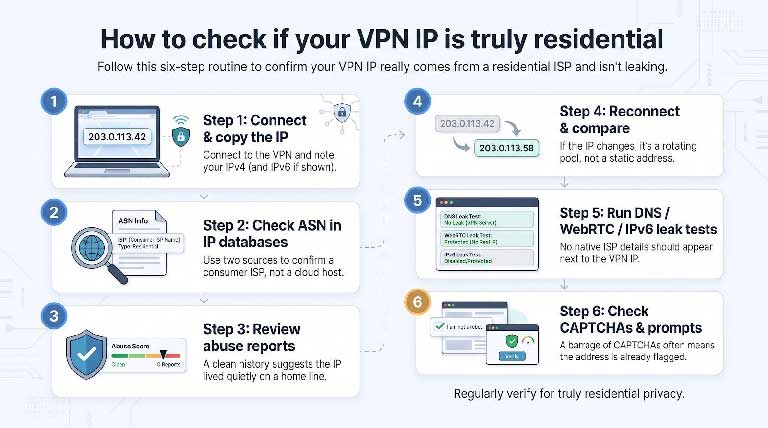
Use this six-step routine whenever you test a claimed residential address:
Follow this five-minute checklist to lock your new residential address onto most consumer routers:
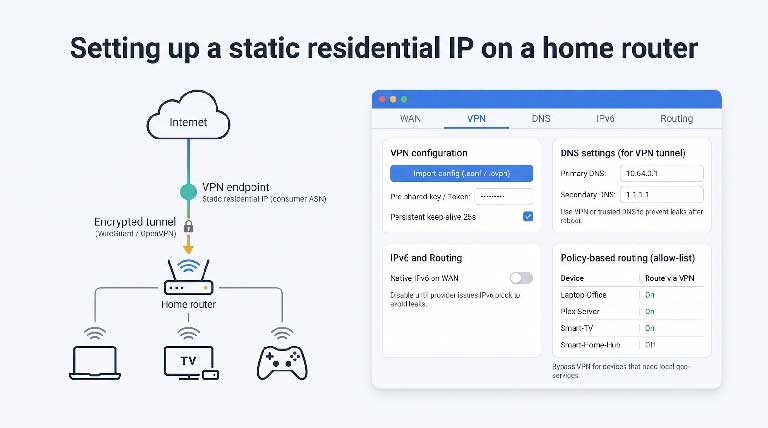
Snapshot these settings and keep the config file somewhere safe; many providers rotate keys during security updates without notice.
Port forwarding lets you invite the outside world into selected services inside your network without exposing the whole LAN. Open a single port, and friends can stream movies from your Plex server, students can reach a self-hosted Moodle, or clients can preview a WordPress build on your Raspberry Pi. Without it, the VPN tunnel blocks inbound traffic by design, and those apps stay invisible.
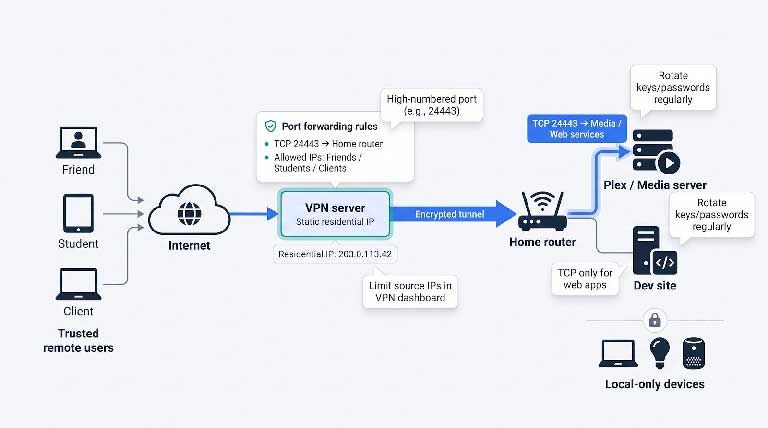
Static residential IPs make forwarding safer because the address rarely shifts and belongs to a consumer ASN, so reputation scores stay clean. Keep these guardrails in place:
Forward wisely and your home lab gains global reach without the headaches of a full DMZ.
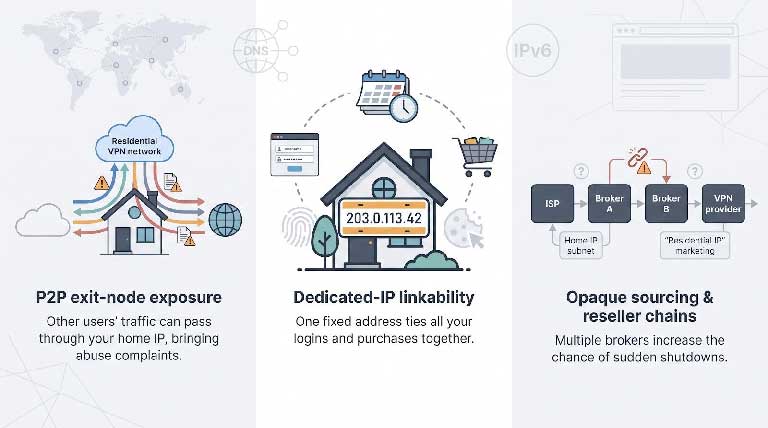
A dedicated residential IP is exclusive, yet that permanence ties every login and purchase back to the same address, much like a personalised licence plate. Marketing trackers and fraud engines can stitch weeks of sessions into one profile.
Mitigate: keep sensitive logins in a hardened browser profile, purge cookies regularly, and switch to a small shared residential pool (for example, Windscribe Static Residential) if you do not need allow-list stability.
Some free or ultra-cheap “residential” VPNs enrol your home line as an exit node. Google’s January 2026 disruption of the IPIDEA proxy network found it funnelled traffic for 550-plus threat groups in one week, all through unsuspecting households. Abuse complaints, DMCA notices, or throttling can land on your doorstep.
Mitigate: avoid services that promise to “let you earn bandwidth,” scan the EULA for the word “exit,” and confirm node sharing can be turned off.
A site may tout “home IPs” while renting subnets from a broker who rents them from someone else. Each extra hand-off raises the chance the ISP pulls the plug when fraud spikes.
Mitigate: ask support two questions before you pay—“Which ISP announces the residential subnet?” and “Do you lease directly or through a broker?” A clear answer signals real control; evasive scripts are a red flag.
A residential IP reduces the loudest detection signal—the ASN—yet it never hides device fingerprints, DNS leaks, or inconsistent browsing habits. Pair any service with tight hygiene, routine leak tests every quarter, and consistent device profiles for realistic protection.
A static residential IP can smooth everyday browsing by lowering CAPTCHA counts and login challenges, but it is not a silver bullet. Combine any of the VPNs above with leak-proof settings, disciplined device fingerprints, and steady browsing habits, and you will see the best results without over-paying for marketing hype.


Discover our other works at the following sites:
Danetsoft is a global web agency headquartered in Indonesia, specializing in web development, managed hosting, and web publishing platform.


 [email protected]
 Magelang, Central Java
 © 2026 Danetsoft. Powered by HTMLy