Thirty minutes before a sales call, the account notes may be spread across a CRM record, a company site, and an invitation. Sales call preparation is more useful when those notes become one page you can check during the conversation. The aim is to walk in with a few sourced facts and better questions, and let the prospect explain what they need.
Use this route: set the call's purpose, collect company and attendee facts, fill the brief, turn evidence into questions, then check the sources once more before joining. A first conversation and a customer follow-up need different questions; the same page format works for both.
Start with the invitation and CRM history you are allowed to read. For a first call, decide whether a second conversation makes sense. For a customer call, check whether a previously discussed workflow has changed. Write the decision as something to investigate, and do not treat a problem you have not confirmed as the prospect's priority.
Salesforce Trailhead's prospecting lesson advises looking at the company's site, announcements, and public information about the person you plan to contact. If the meeting has no agreed agenda, use your relationship record to frame an open question. A confirmed agenda determines which company facts deserve space.
Suppose you are about to speak with an operations lead at a hypothetical B2B software company. You can ask how the team handles a workflow, but you cannot write that the lead owns the budget or that the company has a new initiative without a source.
Begin with the company's own description of its product and customers. Save the page URL and the date you checked it. Then look for one recent announcement relevant to the call, recording its publication date. A homepage claim describes the company but cannot tell you whether a launch is recent. For the attendee, use a public company biography or the person's own public profile to confirm the current title. Any responsibility the page does not state goes into the brief as a question.
An AI meeting prep agent is one optional way to assemble the material. Its page says it researches the company and attendees, reads their pages, and returns a one-page brief with source links and suggested questions tied to published material. Open those links yourself before copying a claim. A manual path works too: browse the original pages and paste each URL beside the corresponding note. Either way, an empty source cell means the claim stays out of the brief.
For the hypothetical account, keep one business description, one dated change if available, and the attendee's confirmed role. More browsing adds little when the reason for the call is still unknown. If an announcement is undated, mark the timing unknown, and do not read buying authority into a job title.
Copy the table into a note or document. Each factual entry gets a link to its original page, or the location of an internal record you have permission to use. Record when you checked it. The status column separates what you verified from what you need to ask.
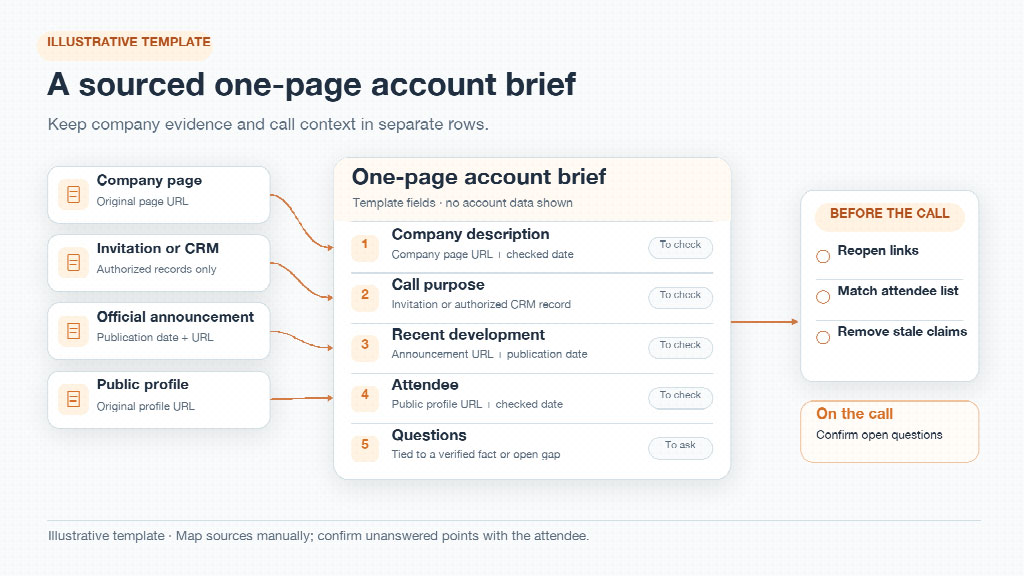
Illustrative template: map company evidence and call context to separate brief fields, then reopen the sources before the call.
| Field | What to enter | Source and checked date | Status |
|---|---|---|---|
| Company and call purpose | The company's own business description; the decision this call should support | Company page URL; invitation or authorized CRM record | Verified / confirm |
| Recent development | One relevant announcement, with its publication date; otherwise leave blank | Original company announcement URL and date checked | Verified / confirm |
| Attendee | Public title and stated responsibilities only | Company biography or person's public page URL and date checked | Verified / confirm |
| Questions | Up to three open questions tied to a verified fact or a gap | Point to the fact above; label a hypothesis | Ask on call |
| Final check | Links reopened, attendee list matched, stale claims removed | Original URLs or authorized record locations; check time | Ready / recheck |
For the hypothetical operations lead, a blank announcement row is better than a guessed launch. If the page grows past one screen, cut the item least relevant to the call's decision. Keep the source and date attached to every fact; do not bury them in another tab.
The meeting-prep page is where the brief itself is described. SpringBrand describes the broader platform as a shared layer of APIs and plugins, so check what the brief includes against the agent page. Your worksheet still needs the original page for each account claim.
The best prospect research changes a question's wording without pretending to know the answer. Say the hypothetical company's own page describes a service for distributed teams. That description supports asking how the operations team coordinates its work. It does not support writing, “They struggle with coordination.” The first is a documented company claim; the second would be an invented diagnosis.
Use a simple evidence-to-question check. If an official announcement names a product change, ask, “How does that change affect the process we are discussing?” If a public biography lists an attendee's role but says nothing about their mandate, ask which part of the process they oversee. If your CRM contains a prior discussion, check the date and ask whether the earlier situation still holds. In each case, the source justifies the question, while the prospect supplies the answer.
Keep three questions at most in the brief: one about the reason for the call, one about a documented change, and one about an unresolved role or workflow. A narrow confirmed agenda may need only one. Put any inference in a “confirm on call” note so you do not read it aloud as fact.
Open each retained source again. Check that the announcement date is visible, the company page still says what the brief attributes to it, and the attendee list matches the invitation. Compare internal history only with records you are authorized to access. A dead link calls for removing or replacing the claim; it is not proof that the claim was true when copied. A changed job title calls for an updated note or a neutral question.
When a fact cannot be confirmed in time, keep the question and drop the assertion. “Are you still responsible for this process?” is safer and more useful than introducing someone with an outdated title. Do the same with an announcement whose publication date you cannot establish. Do not turn a search snippet into the source when the original page will not open.
Keep the brief visible during the call. Start with the decision at the top, then choose one unresolved point to confirm with the attendee. Record the answer after they respond, separate from what you found beforehand.


Discover our other works at the following sites:
Danetsoft is a global web agency headquartered in Indonesia, specializing in web development, managed hosting, and web publishing platform.


 [email protected]
 Magelang, Central Java
 © 2026 Danetsoft. Powered by HTMLy