Picture a server that monitoring shows at 94% CPU while the asset register lists it as retired since March. Operations wants to know what runs on it; the asset manager wants to know why a retired box still consumes a Windows Server license. That record conflict is ITAM vs ITOM in practice.
IT asset management (ITAM) tracks what the organization owns, what it paid, who uses it and whether it is licensed. IT operations management (ITOM) keeps the same estate running through monitoring, event handling, capacity planning and automation.
In short, ITAM vs ITOM comes down to two questions. ITAM asks "what do we have and what does it cost?" ITOM asks "is it working, and what breaks if it stops?" Both depend on the same discovery data, which is why ITIL 4 treats them as separate practices joined by service configuration management.
ITAM is a lifecycle and money discipline. A hardware record moves from ordered to deployed, in repair, retired and disposed, and each transition needs a date, an owner and a location. For software, the asset team compares entitlements with what discovery finds installed, then buys, reclaims or uninstalls. The reference standard is ISO/IEC 19770-1.
The pressure is financial. Flexera's 2026 State of ITAM Report (512 respondents) found that complete visibility into the IT estate fell to 36%, from 43% a year earlier. Nearly half (48%) were audited in the last year, 44% spent over $1 million on audits in three years, and 64% had a Microsoft audit in that period.
ITAM owners are asset managers, procurement and finance. They are judged on license position and reclaimed spend, not uptime.
ITOM runs on a shorter clock. It polls devices over SNMP, WMI or agents, usually every one to five minutes, correlates events into incidents, runs patch and configuration jobs and maps which applications depend on which servers. Sysadmins, network engineers and NOC or SRE teams own it and measure uptime, MTTR and change failure rate.
Blind spots here show up as downtime. In Uptime Institute's 2025 survey, 57% of operators said their latest major outage cost more than $100,000, and one in five put it above $1 million. Uptime links part of the rise to longer recovery times, which is where missing ownership and configuration data slows teams down.
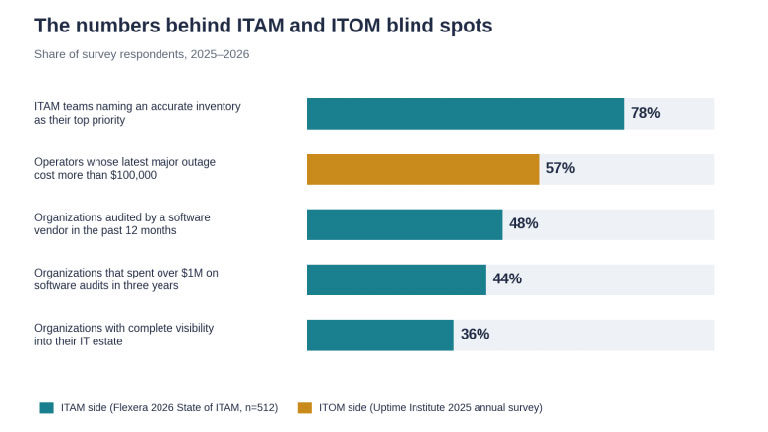
Figure 1. Survey figures behind both disciplines. Sources: Flexera 2026 State of ITAM Report; Uptime Institute Annual Outage Analysis 2026.
Most ITAM vs ITOM confusion comes from both disciplines looking at the same devices. They differ in the question asked, how fresh the data must be and who is accountable when it is wrong.
Table 1. IT asset management vs IT operations management
| Dimension | ITAM | ITOM |
|---|---|---|
| Core question | What do we own, what did it cost, is it licensed? | Is the service up and fast enough, and what depends on it? |
| Time scale | Months to years: warranties, renewals, depreciation | Seconds to hours: polling, alerts, incident windows |
| Main data | Price, vendor, contract, entitlement, assigned user, location, lifecycle state | Metrics, events, logs, configuration state, dependencies |
| Freshness needed | Daily or weekly audit is enough for license counts | 1–5 minute polling; near real time for alerts |
| Owners | Asset manager, procurement, finance | Sysadmins, network engineers, NOC, SRE |
| Success metrics | License position, reclaimed spend, audit findings | Uptime, MTTR, change failure rate, alert noise |
| Frameworks | ISO/IEC 19770-1; ITIL 4 IT asset management | ITIL 4 monitoring and event management; infrastructure and platform management |
| Failure when missing | Audit true-ups, ghost assets, duplicate purchases | Longer outages, blind changes, slow root cause analysis |
The overlap in the ITAM vs ITOM split is narrow, but everything else rests on it: discovery, the configuration management database (CMDB) and change.
Both sides need a scan that finds unregistered devices. Agentless scanning (WMI or WinRM for Windows, SSH for Linux and macOS, SNMP for network gear) needs credentials and open ports in each segment. Agents typically need only outbound HTTPS on port 443, so they win for laptops on home Wi-Fi. Most mid-sized estates run both.
A CMDB helps only if both teams identify devices the same way. Hostname is the weakest key because reimaging changes it. Serial numbers work for hardware, MAC addresses break with docking stations, and cloud resources need the provider's instance ID. Pick the key before importing a single spreadsheet, or the first quarter goes to merging duplicates.
A change request touches both at once. ITOM asks what breaks during the window; ITAM asks whether the replacement is licensed and who pays. If the CMDB links a server to its contract and its services, one change record answers both.
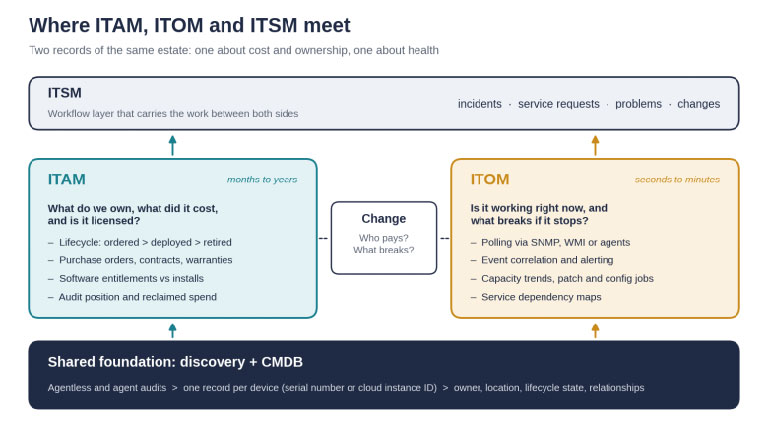
Figure 2. ITAM and ITOM read from one discovery and CMDB layer and hand work to each other through ITSM.
ITSM is the third term in most ITAM vs ITOM discussions: the workflow layer for incidents, requests, problems and changes. ITIL v3 put operations inside its Service Operation stage, so some vendors still call ITOM a subset of ITSM. ITIL 4 replaced those stages with 34 practices, and ITSM now consumes data from both sides.
The goal is a ticket that shows a device's warranty from ITAM next to its last 24 hours of alerts from ITOM.
Alloy Software's sales team hears one pattern: companies rarely take on service management before asset management is under control. The first requests are practical. Track expensive equipment, resolve issues faster, see what changed since last week.
In Alloy's review of 40+ deals closed in 2024–2026, at least 12 buyers ran assets in spreadsheets, email or homegrown databases. Triggers were failed audits or compliance deadlines, vendor price hikes and forced cloud migrations. About 40% required on-premises hosting, typically HIPAA-bound hospitals, public agencies and air-gapped aviation or energy sites.
The second failure is reporting. Collecting data is easy; analysis is where ITAM vs ITOM projects stall, usually because teams create more ticket categories than anyone can report on. Two levels and at most 25 leaf categories is a workable start.
The ranking targets teams of 2–35 technicians with roughly 100 to 5,000 endpoints, scored on ITAM depth, ITOM coverage, built-in ITSM, hosting and published pricing. Prices are annual-billing list prices as of September 2026, excluding implementation.
Table 2. ITAM and ITOM coverage by vendor, September 2026
| Tool | ITAM | ITOM coverage | Hosting | Entry price | Best fit |
|---|---|---|---|---|---|
| 1. Alloy Navigator + AlloyScan | Lifecycle, licenses, contracts, POs, consumables, equipment checkout | Agent and agentless discovery, network map, CMDB and change (Enterprise); no performance monitoring | On-premises, Alloy SaaS or own Azure/AWS | $19/tech/mo (up to 3 techs); $49 Express; $89 Enterprise | 2–35 techs wanting ITAM and ITSM in one system, any hosting |
| 2. ManageEngine SDP + OpManager | Assets from SDP Professional up | OpManager monitoring (per device); patching in Endpoint Central | On-premises or cloud | SDP Cloud $13 / $27 / $67 per tech/mo | Monitoring from the same vendor, several consoles accepted |
| 3. ServiceNow ITAM + ITOM | Hardware and Software Asset Management | Discovery, Service Mapping, Event Management, AIOps | SaaS | Quote only; ITOM est. $150–200 per user/mo | 1,000+ employees with a platform team |
| 4. SolarWinds Service Desk + Observability | In Service Desk, $0.30–0.50 per device/mo | Network and server monitoring from about $8 per node/mo | Desk SaaS; monitoring SaaS or self-hosted | $39 / $79 / $99 per tech/mo | Monitoring-first teams with a NOC |
| 5. Freshservice | Included, 100 weighted asset units | Alert Management (Pro and up) ingests external alerts | SaaS only | $19 / $49 / $99 per agent/mo | Cloud-only teams wanting fast setup |
| 6. Lansweeper | Discovery-led inventory; lifecycle insights on Pro | Discovery only; feeds other service desks | On-premises scanning, cloud console | Free up to 100 assets; $239/mo for 2,000 | Discovery layer under an existing ITSM tool |
Alloy covers the ITAM side plus the discovery, CMDB and change part of ITOM. Alloy Navigator handles lifecycle, software licenses, contracts, purchase orders and equipment checkout alongside incident, problem and change management. AlloyScan, the cloud-native discovery product replacing the legacy Alloy Discovery, feeds the same records.
Pricing for Alloy's IT asset management software is published. Software licensing starts at the $49 Express tier; the CMDB needs Enterprise at $89. Audit licenses apply only to auto-discovered computers. Across Alloy's 2024–2026 deals, annual budgets clustered at $1,000–3,500 for one to four technicians and $3,500–7,500 for five to ten.
Hosting is why it ranks first here: the same product runs on-premises, as Alloy-hosted SaaS or in your own Azure or AWS tenant, and Alloy passed a SOC 2 Type II audit in 2025. The limits are real. There is no performance monitoring, so pair it with PRTG or Zabbix, and Alloy-hosted cloud adds a hosting fee.

ManageEngine gives the widest ITOM coverage for the money, split across ServiceDesk Plus, OpManager (licensed per device) and Endpoint Central for patching. On lower ServiceDesk Plus editions, CMDB, change and the service catalog are paid add-ons, so real quotes land well above $13. Expect three consoles and three renewal dates.
ServiceNow has one of the deepest ITOM stacks available, with Discovery, Service Mapping and Event Management on the same data model as its asset modules. Third-party estimates put implementation at three to five times the first-year license.
Discovery is licensed by CI count, and licensing advisor Redress Compliance describes a client at 4.2 times its contracted tier, a $380,000 true-up exposure.
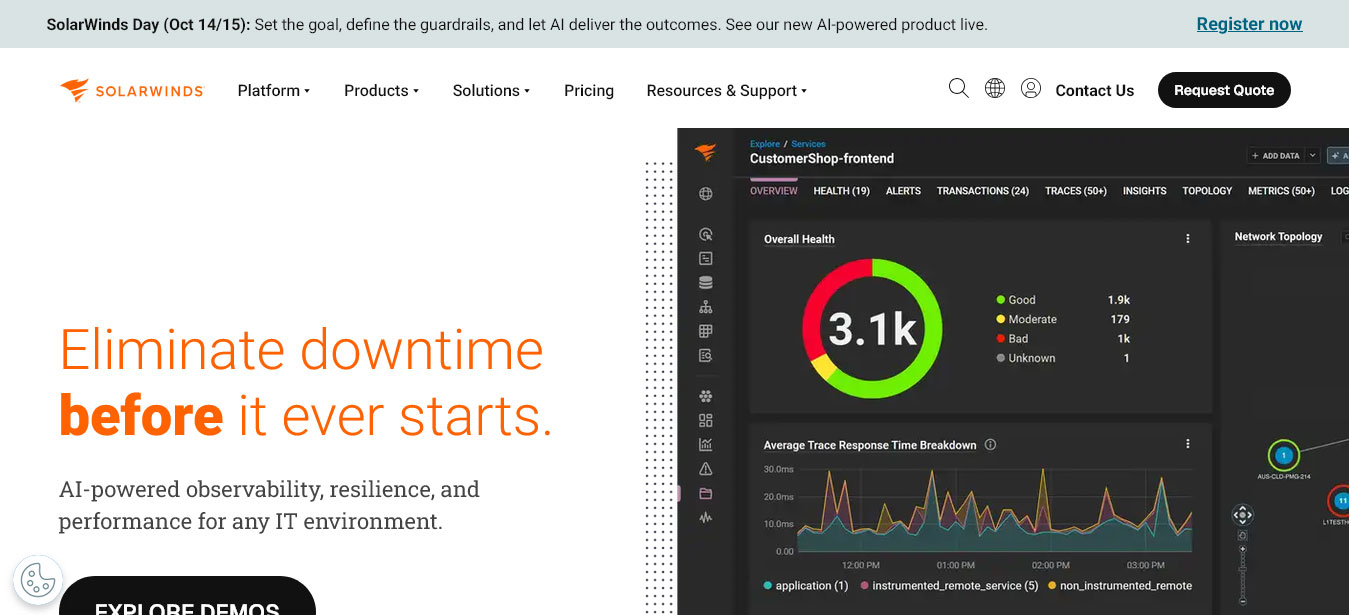
SolarWinds starts from monitoring, and network performance is its strongest area. Service Desk and Observability are bought and run separately, and asset management inside Service Desk adds a per-device monthly fee, so ITAM depth depends on how much you configure there.
Freshservice is the quickest to stand up if you accept cloud-only hosting. Change, problem and release management start at the $99 Pro tier, as does Alert Management, which ingests alerts from Zabbix, PRTG, Nagios or OpManager rather than polling devices itself.
Lansweeper is a discovery specialist built to feed other service desks, and Pro ($439 per month) adds OT discovery plus vulnerability and lifecycle insights. The jump from 100 free assets to a 2,000-asset minimum draws the most complaints. It was the most common named incumbent in Alloy's 2024–2026 deals, once after a renewal that doubled the price.
The ITAM vs ITOM sequencing answer is consistent: asset foundation first, monitoring second, because alerts on devices without an owner or lifecycle state cannot be routed. For teams of 2–35 technicians:
A mid-market platform with discovery and a CMDB covers steps one to four. You need a dedicated ITOM suite on top when you see:
Discovery is the one component neither side of ITAM vs ITOM can skip, and cheap tools cut corners there. Ask whether a tool separates quick discovery from a full audit, merges agent and agentless data into one record, and covers more than Windows.
AlloyScan does all three. An Audit Service scans a segment and audits reachable devices, while an Audit Agent on Windows, macOS or Linux reports over outbound HTTPS 443. Coverage extends to SNMP gear, VMware ESXi and AWS, Azure and Google Cloud, though the cloud segments are still in preview.
Since version 26.7, AlloyScan also collects recent Critical and Error events from Windows logs during audits. It does not patch devices or scan for vulnerabilities.
A small Swedish IT services firm has run Alloy Navigator Express since February 2023. Its founder compared it with NinjaOne and put the difference plainly: bottom-up automation fills the system with data nobody needs, and he wanted control over what gets recorded. His one complaint is invoicing, which he still calls a weak spot.
If your ITAM vs ITOM question is really a budget question, fund discovery and a CMDB both teams trust, then add monitoring. For on-premises or mixed hosting, Alloy Navigator with AlloyScan covers that foundation at $19–89 per technician per month. ServiceNow makes sense once a platform team has thousands of CIs to correlate.
ITIL v3 placed operations inside its Service Operation stage, so older material calls ITOM a subset of ITSM. ITIL 4 dropped those stages. Today ITOM has its own tools, owners and KPIs, and it feeds alerts and changes into ITSM.
No. The difference between ITAM and ITOM shows in decisions: reclaiming a license or skipping a hardware refresh never appears in an operations runbook, even though both teams read the same CMDB and discovery data.
Partly. Alloy Navigator covers ITAM, ITSM, discovery, CMDB and change in one system, which is enough for most teams under 35 technicians. Real-time monitoring and alert correlation still need a dedicated monitor or, at enterprise scale, ServiceNow ITOM.
Start with ITAM: discovery, a clean asset register and license records. Otherwise alerts point at devices with no owner, location or warranty, and every incident begins with detective work.


Discover our other works at the following sites:
Danetsoft is a global web agency headquartered in Indonesia, specializing in web development, managed hosting, and web publishing platform.


 [email protected]
 Magelang, Central Java
 © 2026 Danetsoft. Powered by HTMLy