
A DKIM selector is not just a label—it is the switch that tells validators which DKIM public key to fetch during email authentication. Inside the DKIM-Signature header, the s= tag carries the DKIM selector, while the d= tag declares the signing domain. Together, they connect a digital signature generated with a private key to a matching public key published in your domain DNS records. Because DMARC evaluates domain alignment between the visible From header and the d= domain, your DKIM selector choices directly influence whether your messages pass alignment and avoid email spoofing flags.
The outcome is straightforward: when the DKIM-Signature header’s digital signature verifies successfully using the correct DKIM public key from DNS, the receiving server gains high confidence in message integrity and domain ownership. When the s= tag points to the wrong place—or the d= tag does not align with the From header—DMARC alignment breaks, even if the signature verification succeeds cryptographically.
s= maps to selector._domainkey in DNSThe DKIM selector is the value of the s= tag in the DKIM-Signature header. During the verification process, the receiving server performs a DNS query for s=._domainkey.d= to retrieve the DKIM public key. For example, if the d= tag is example.com and the s= tag is dkim1, the validator looks up the TXT record at dkim1._domainkey.example.com. That TXT record stores the DKIM public key (typically v=DKIM1; k=RSA; p=...), used to validate the digital signature.
Selectors give the domain owner the flexibility to run multiple signing keys, support key rotation, and segment keys by platform or mail relay. In some architectures, a CNAME record is used instead of a TXT record to point selector._domainkey to a hosted DKIM key at a third-party provider (for example, selector1._domainkey.example.com CNAME selector1._domainkey.exampleprovider.com). This approach simplifies key publishing and key management while preserving the d= tag’s domain alignment.
SPF: Checks whether the sending IP is authorized to send mail for the envelope domain. It does not sign content and can break on forwarded emails. Its identity is the MAIL FROM/Return-Path, not the From header.
DKIM: Applies a digital signature over selected email headers and the body, using a cryptographic key pair (private key to sign, public key in DNS to verify). The DKIM-Signature header includes thes= tag (selector), d= tag (signing domain), algorithm details (e.g., RSA and SHA256), and canonicalization (e.g., relaxed canonicalization). DKIM’s identity is the d= domain.
DMARC: Requires alignment. It looks at the From header and then checks whether either SPF’s domain or DKIM’s d= domain aligns with that visible sender domain. DMARC is the policy layer that ties the authentication check to an enforcement outcome.
Alignment means the authenticated domain matches the sender domain (either exactly, in strict mode, or at the organizational-domain level, in relaxed mode). In practical email transmission, this is why the DKIM selector matters: by determining which DKIM public key is used and which signing identity appears in the DKIM-Signature header, the selector influences whether DMARC alignment can succeed.
d=Relaxed alignment: The DKIM d= tag must share the same organizational domain as the From header. Example: d=mailer.example.com aligns with From: [email protected].
Strict alignment: The DKIM d= tag must exactly match the From header domain. Example: d=example.com must equal From: [email protected].
Regardless of mode, the DKIM-Signature header anchors the identity DMARC tests. If the s= tag causes the DNS lookup to retrieve a DKIM public key that belongs to a d= tag outside the sender domain, domain alignment fails even if signature verification succeeds.
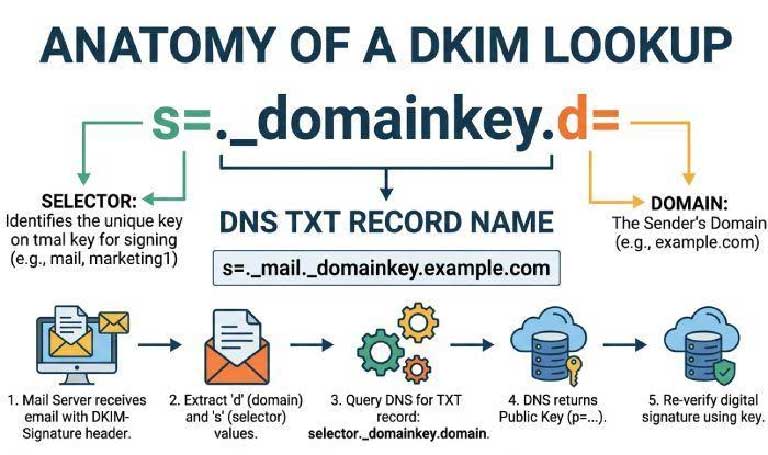
d= domainThe DKIM selector controls which key record is fetched, but the d= tag is the identity DMARC aligns. When you host multiple selectors across platforms, ensure each DKIM-Signature header presents a d= tag that matches (or organizationally matches) the From header domain. That is, the selector determines the key; the d= tag determines the identity.
A quick, real-world example
[email protected]d=example.com; s=dkim1; a=rsa-sha256; c=relaxed/relaxed; h=from:subject:date:todkim1._domainkey.example.com → TXT with v=DKIM1; k=RSA; p=MIIB...Contrast that with a misconfigured third-party provider that signs with d=exampleprovider.com. The DKIM public key validates, but DMARC alignment fails because the d= tag does not align with example.com.
d= with From across all sendersA disciplined selector strategy empowers the domain owner to maintain domain alignment and email integrity at scale.
Inventory every sender domain and email provider: Microsoft 365/Exchange Online/Office 365, Salesforce.com, Gmail, marketing platforms, help desk systems, and any mail relay or infrastructure provider.
Assign distinct selectors per platform: Use names like dkim1, trans-2026, or vendorX to separate keys, support key rotation policy, and streamline setup DKIM updates.
Enforce the right signing identity: Configure each platform to sign with d=example.com (or a subdomain you control) so the DKIM-Signature header’s d= tag aligns with the From header.
Prefer relaxed canonicalization and modern algorithms (RSA with SHA256) to maximize resilience across email transmission and header inspection variations.
Plan for key rotation and strong key management. Rotate each cryptographic key pair on a schedule, retire old selectors gracefully, and validate propagation before switching. Hosted DKIM key models—via a CNAME record to the provider’s selector—simplify key publishing while leaving the domain owner in charge of domain DNS records. Whether self-hosted or hosted, keep records tidy, perform record validation, and check DKIM records after every change.
If a third-party provider must manage its own private key, use DKIM key delegation with CNAME redirection so you keep the d= tag rooted in your sender domain. This preserves domain alignment while allowing the provider to handle signature creation and cryptographic authentication. Test with forwarded emails to confirm the verification process survives common routing changes.
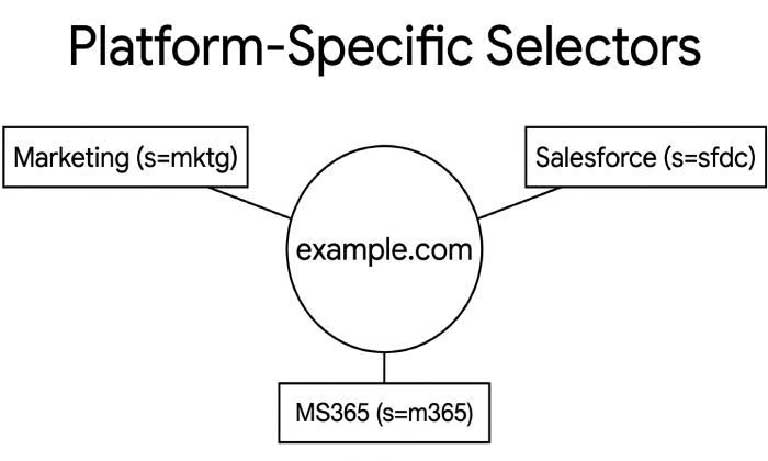
d=, and keeping alignment intactThird-party platforms often default to signing with their own domain unless you configure a custom d=. Your objective is clear: all DKIM-Signature headers carrying your mail must present a d= tag that aligns with your visible From header.
selector._domainkey.example.com as a CNAME to selector._domainkey.exampleprovider.com. The provider hosts the DKIM public key and handles key rotation. You retain control of the d= domain and domain DNS records.dkim1._domainkey.example.com. This keeps everything under your DNS, aiding mail security audits and BIMI readiness.Both models require careful key publishing, DNS lookup tools to confirm propagation, and routine check DKIM records for integrity. Ensure every platform supports a custom d= and that the s= tag routes to the right DKIM record.
Microsoft 365 / Exchange Online / Office 365: Enable DKIM per domain, select custom selectors, and confirm the DKIM-Signature header uses d=example.com. Outlook and Gmail recipients rely on accurate message integrity; view Internet headers to confirm.
Salesforce.com: Configure a custom d= and publish CNAME or TXT records as instructed; validate with test sends.
Gmail and other providers: Ensure the sender domain in the From header matches the d= tag. Some providers offer a hosted DKIM key with automated key rotation.
Use tools like dmarcian (Email Delivery Center, Delivery Center Plus, Mailflow Monitoring, Bulk Lookups, Managed Services) to monitor domain alignment across sources. MXToolbox SuperTool, dmarcian’s DKIM Inspector, and various DKIM validator services help with record validation and signature verification.


Discover our other works at the following sites:
Danetsoft is a global web agency headquartered in Indonesia, specializing in web development, managed hosting, and web publishing platform.


 [email protected]
 Magelang, Central Java
 © 2026 Danetsoft. Powered by HTMLy