 Photo by Headway on Unsplash
We all know that you have to have a website in 2026, no matter what industry you’re in. It has to be user-focused, mobile-optimized, easy to navigate, and easy on the eyes.
But is it safe? Sensitive industries (like healthcare, financial organizations, and so on) need to make absolutely sure that all data is protected. Their customers rely on that.
Today, you’ll learn more about healthcare website design, how to keep your site safe, and how to make sure your audience is taken care of.
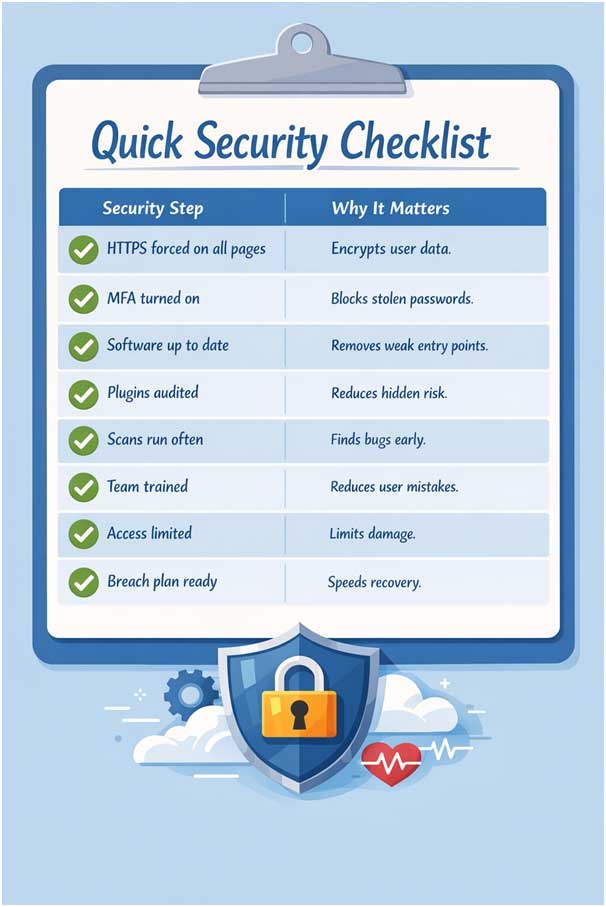
Every page on your site needs to use HTTPS. HTTPS encrypts the connection between the user’s browser and your server. Without it, attackers can listen in or change data in transit.
Many sites still slip up. Some healthcare providers use plain HTTP for parts of their site, and by doing that, they open the door to attacks.
Just one strong password isn’t good enough. You should use multi-factor authentication (MFA). MFA asks for two things before letting someone in (like a password and a code sent to a phone). It’s way safer and easy to implement.
One of the biggest risks for data breaches is outdated software. That’s why you have to update all systems as soon as new ones are released. Don’t let old code stay online.
Many healthcare websites use content systems like WordPress or custom CMS tools. Plugins and add-ons can introduce risk.
Some plugins have flaws that let attackers gain admin rights or run harmful code. Review all plugins often:
Less is more. Fewer plugins mean fewer weak spots.
Use security scanning tools to test your website. These tools can check for SQL injection, cross-site scripting (XSS), if you have any outdated components and weak server configs, and more. Do them weekly and before major updates. Also consider professional security tests before launch.
And vulnerabilities are more common than you think. For example, a serious vulnerability has been discovered in the CareFlow Electronic Health Record (EHR) platform.
A site is only as secure as the people who manage it. Most breaches happen because someone clicked a phishing link or used a weak password.
Set up yearly training on:
Staff training reduces careless mistakes that can bring down a secure system. Learn how to build a human firewall and see how much your security improves.
Not everyone needs access to everything. Use role-based access control (RBAC):
Limiting rights protects your data if an account is compromised. It also helps reduce mistakes. And you can review user roles every quarter. Remove access for people who change jobs or leave.
No system is perfect. If a breach happens, speed matters. Have a plan that includes:
Test your plan every six months. A practiced response cuts damage and restores service faster.
Website security is not something you finish and forget. It needs regular care. Threats change often, and attackers look for easy targets. A site that was safe last year may not be safe today. That is why security should be part of everyday work, not a last-minute task.
And when you work in healthcare, protecting your patients’ information is everything. Just one hack at UnitedHealth's tech unit affected around 192.7 million people.
These breaches aren’t just damaging. They’re expensive. They cost an average of $7.42 million per incident.
Start by setting clear routines. Decide who checks updates, access rights, and alerts. Make these checks part of weekly or monthly work. Keep the process simple so it actually happens. Long checklists tend to get ignored. Short, clear steps work better.
Good security also depends on ownership. When everyone is responsible, no one really is. Assign one person or team to oversee website security. They don’t need to fix everything themselves. They just need to make sure tasks are done and issues are tracked.
Documentation helps more than people expect. Write down how your site is set up, who has access to it, and what tools you use. This makes changes safer and faster. It also helps when staff members leave or new ones join. Clear notes reduce mistakes that lead to breaches.
Communication matters too. Teams should feel safe reporting problems. If someone clicks a bad link or notices strange behavior, they should speak up right away. Blame makes people quiet. Quiet problems grow.
It’s also smart to plan for busy or stressful periods. Mistakes often happen during site redesigns, system moves, or staff changes, so just pay close attention.
Finally, balance security with usability. Overly strict rules frustrate users and staff. Weak rules invite risk. Aim for clear, reasonable controls that people can follow every day.
Healthcare websites carry a lot of trust. Patients expect their data to stay safe. Security breaches can damage trust and expose people’s private lives. That’s why many organizations work with a healthcare software consultancy to build secure, compliant, and reliable digital healthcare solutions
The good news? You don’t need to be a security genius.
Start with basics like HTTPS and strong logins. Keep systems patched. Train your team. Then build from there. You can think of your site as a living thing. It needs constant care, not just one setup.
If you follow our tips and work on creating better habits, your healthcare website will stand a much better chance against threats in 2026.


Discover our other works at the following sites:
Danetsoft is a global web agency headquartered in Indonesia, specializing in web development, managed hosting, and web publishing platform.


 [email protected]
 Magelang, Central Java
 © 2026 Danetsoft. Powered by HTMLy