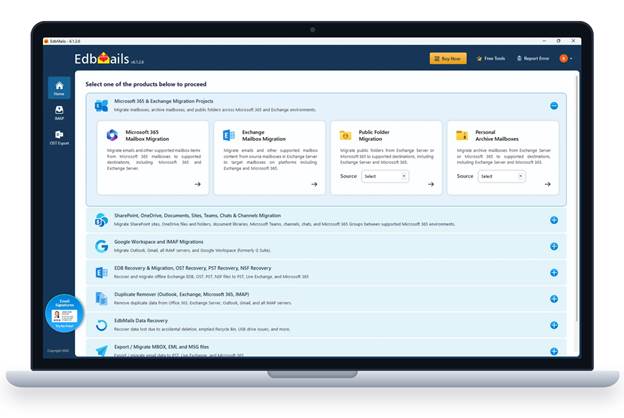
Migrating mailboxes between Microsoft 365 tenants is one of the more demanding jobs in IT. Mergers, divestitures and rebrands all end the same way: thousands of mailboxes, calendars and shared folders have to land in a new tenant with their data intact and with as little disruption to users as possible.
Administrators usually face a split choice. The native route leans on PowerShell, per-method prerequisites and Microsoft Entra ID configuration. Subscription migration services remove the scripting, but typically route mail through the provider's own cloud and charge per user or by subscription.
The EdbMails Microsoft 365 Migration Tool offers an alternative to both. It installs on a Windows PC or server, migrates data directly from source to target with no intermediary EdbMails server or storage in between, and is licensed per source mailbox with a lifetime license. This review covers how a Microsoft 365 Tenant to Tenant Migration runs, how the licensing works, and where Microsoft's own limits still set the pace.
| Best for | Admins running a Microsoft 365 Tenant to Tenant Migration, or migrating Microsoft 365 mail to Exchange Server, PST or IMAP, who prefer a graphical workflow to PowerShell batches. |
|---|---|
| License | The Office 365 Migration license is for Microsoft 365 as the source. Exchange, IMAP and Google Workspace sources run in the same application under their own licenses. |
| Standout | Microsoft Graph API support for Microsoft 365 migration, plus the fiddly setup: app registration in Microsoft Entra ID, mailbox mapping, and help with target user creation and license assignment. |
| Value | A lifetime per-mailbox license with free software upgrades and free 24/7 technical support, at pricing EdbMails puts up to 50% below most competitors. |
| Watch for | Speed depends on the migration machine and on Microsoft's throttling, and permissions need to be reapplied and tested after the migration. |
The EdbMails Microsoft 365 Migration Tool bundles the chores around a migration into one application: registering an app in Microsoft Entra ID, matching old users to new ones, working inside Microsoft's throttling limits, and producing a record that shows what was and was not copied.
Within the Office 365 Migration license it covers tenant to tenant migrations, Microsoft 365 to Exchange Server, Microsoft 365 to PST, Microsoft 365 to IMAP and bulk PST import, including archive mailboxes. The Microsoft 365 Tenant to Tenant Migration path has its own page, Office 365 Tenant to Tenant Migration.
An Office 365 to Office 365 job runs in ten stages. The notes below follow the step-by-step guide.
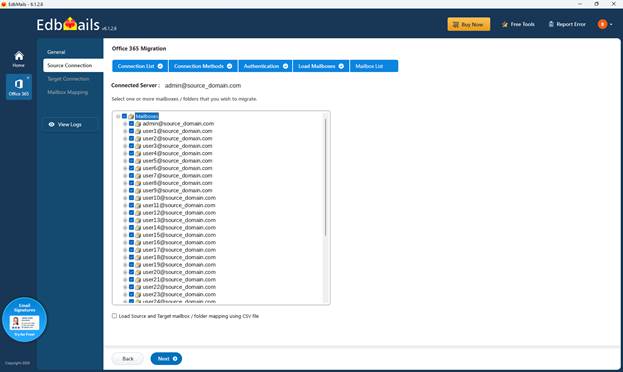
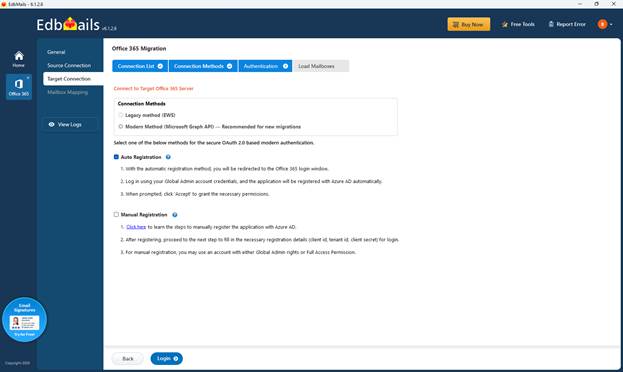
Before the first run, plan for a Global Administrator account on both tenants so that the Microsoft Entra ID app can be registered automatically. If public folders or In-Place Archives are in scope, they need to be prepared on the target first.
The host machine runs Windows 7 to 11 or Windows Server 2003 to 2022, in 32-bit or 64-bit editions. It needs .NET Framework 4.6.2 or higher and Windows PowerShell 3.0 on the host, and runs best with at least a quad-core processor and 4 GB of RAM. Outlook is needed only for PST export. Admins do not write scripts, but the PowerShell prerequisite is worth knowing about on locked-down servers.
The EdbMails Microsoft 365 Migration Tool supports the Microsoft Graph API, and the connection screen offers it as the Modern Method, marked as recommended for new migrations. The Legacy method (EWS) is still listed for projects that need it. For a new Microsoft 365 Tenant to Tenant Migration, the Graph API option is the sensible default, as the screen itself recommends it.
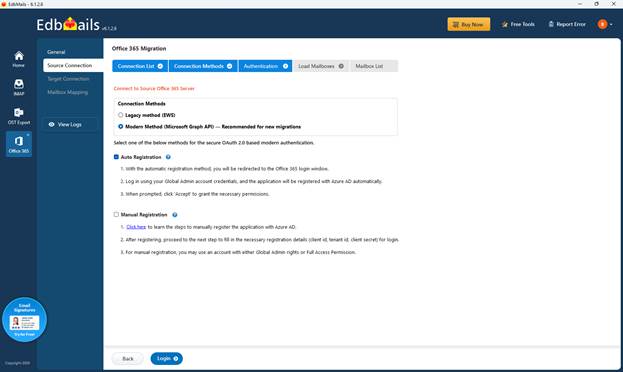
Sign-in uses OAuth 2.0 modern authentication. Sign-in happens on Microsoft's own page, and credentials are not stored on EdbMails servers. Traffic in transit uses TLS 1.2, and the metadata used for incremental comparison is encrypted with AES-256 and stays on the machine that ran the migration. Multi-factor authentication is supported on both the source and target tenants.
App registration in Microsoft Entra ID can be automatic, when a Global Administrator signs in, or manual for admins who prefer to set it up themselves. EdbMails is ISO/IEC 27001 certified and follows GDPR-compliant data handling. Security teams should still validate this against their own review before a cutover.
Automatic mapping matches source and target mailboxes using user attributes such as first and last names and display names. Administrators review the result and override any wrong match before the run. For larger or irregular projects, a CSV file can define mailbox and folder mappings, and a source folder can be mapped to a differently named target folder, which helps when a mailbox uses a localized folder name.
In supported scenarios EdbMails can also assist with creating target users and assigning available licenses during the job, using a CSV file to set the details. Created and licensed target mailboxes are still a prerequisite on the target tenant, so confirm that the plan and licenses cover every user before the run.
By default everything is migrated except Deleted Items, Conversation History and Junk Email, which are excluded. Filters then narrow a job by received date, folder, sender, recipients (To, Cc and Bcc), subject, attachment name and read or unread status, and conditions can be combined with AND or OR. A size threshold, adjustable from 1 MB to 1,000 MB, excludes emails or attachments above the chosen limit.
The first run is a full migration. From the second run onward EdbMails switches to incremental mode and transfers only new or changed items, so repeat runs do not create duplicates. An option labeled Remove deleted source items from the target servers syncs deletions on a follow-up run. That pattern suits staged cutovers: migrate early, then run deltas before the switch.
Throttling is where many projects slow down. Automatic throttling management is on by default, so EdbMails detects throttling errors and retries, and jobs can be paused and resumed. That reduces babysitting, but Microsoft's limits still apply whichever tool runs the job.
Parallel mailbox migration is the main speed lever. EdbMails supports up to 20 parallel mailbox migrations, and the practical number depends on the machine's logical processors, available RAM, upload bandwidth and Microsoft 365 service conditions. After a run, the migration report lists source and target mailboxes, excluded folders, migrated item counts per mailbox and any errors, with a cumulative view across the job. The logs under View Log show status, warnings and errors per mailbox, and they are worth reading, together with a check of the target mailboxes, before declaring a cutover complete.
EdbMails is one Windows application, but it is not one license. The Office 365 Migration license applies when Microsoft 365 is the source. Other source platforms use the same interface, and each is licensed on its own.
| Migration | License it falls under |
|---|---|
| Microsoft 365 Tenant to Tenant Migration | Office 365 Migration |
| Microsoft 365 to Exchange Server | Office 365 Migration |
| Microsoft 365 to PST | Office 365 Migration |
| Microsoft 365 to IMAP | Office 365 Migration |
| Multiple PST files to Microsoft 365 | Office 365 Migration |
| Exchange Server to Microsoft 365 | Exchange Server Migration |
| IMAP to Microsoft 365 | IMAP / POP3 Migration |
| Google Workspace to Microsoft 365 | Separate Google Workspace license |
Planning tip. Match the license to the source platform before buying. A bundle that combines Exchange and Office 365 mailboxes is also listed on the pricing page, where current terms can be confirmed.
Within the Office 365 Migration license, licensing is per migrated source mailbox. Current prices stay on the pricing page.
| Item | License use |
|---|---|
| Mailbox, including re-runs | Only the selected source mailboxes are counted, and migrating the same licensed mailbox again does not use another slot. |
| Archive mailbox | Has its own licensing considerations, so confirm the count before purchase. |
| Public folders | Consume 50 mailbox licenses, after which public folder migration is unlimited. |
| SharePoint, OneDrive and Teams | A separate plan, priced by the number of sites. |
The free trial migrates up to 30 items per folder from each mailbox, which is enough to test sign-in, mapping, folder handling, filters and the migration report on a pilot set.
Fewer manual setup steps. App registration, mapping, mailbox creation and license assignment can all be handled inside the tool.
Several directions in one application. Tenant, Exchange, PST and IMAP paths share the same interface and reporting.
Controls that match real projects. Filters, selective mailbox lists, folder mapping for localized names, and pause and resume cover the awkward cases.
Incremental runs. Later passes carry only new or changed items, which suits migrate early and cut over later plans.
Item-level reporting. Per-mailbox item counts plus warnings and errors in the report give something concrete to check.
Cost-effective licensing. A lifetime license billed only for the source mailboxes migrated avoids the recurring per-user charges of subscription services. EdbMails puts its pricing at up to 50% below most competitors, a figure worth checking against your own quotes.
Free upgrades and 24/7 support. Software upgrades and technical support by live chat, email and phone are both free for a lifetime, so the cost of a long project does not grow with each new version or support request.
Full feature set to evaluate. The free trial opens every Office 365 Migration feature, limited only by the 30 items per folder, so nothing is held back before a purchase decision.
Licenses follow the source platform. A Microsoft 365 source uses the Office 365 Migration license. Exchange, IMAP and Google Workspace sources need their own.
Speed depends on the machine. Logical processors, RAM, upload bandwidth and Microsoft 365 service conditions all set throughput, so measure on the real migration host.
Microsoft's limits still apply. Exchange Online applies a default item cap of 25 MB, which can be raised to 150 MB, plus throttling and quotas on both tenants.
Large archives take time. Archive mailboxes over 100 GB depend on Exchange Online provisioning extra storage, which can take up to 30 days.
Some items need follow-up. Permissions are a separate workload to reapply and test after the migration, and Deleted Items, Conversation History and Junk Email are excluded by default.
Protected mail needs testing. Encrypted or rights-protected items may not be available to a migration application in the same way as ordinary mailbox items, so include some in the pilot.
Cutover chores remain manual. MX records, Autodiscover and rebuilding Outlook profiles for users who report problems are post-migration activities.
Once mail routing, Autodiscover and Outlook profiles are sorted, one visible detail is easy to overlook: the email signature. Signatures kept in each user's old Outlook profile, or applied by the old tenant's mail flow rules, typically do not follow a mailbox to the new tenant. A migration is a good moment to replace a patchwork of personal signatures with one managed set.
That is the job of Sigsync Microsoft 365 Email Signature Management Software, a centralized, web-based signature and disclaimer service for Microsoft 365 and Exchange tenants. Administrators design signatures in a drag-and-drop editor with ready-made templates, fill each user's details from Azure AD or Active Directory fields, and assign different signatures by group, department, sender, recipient, reply or forward. Signatures can also be scheduled for campaigns and banners.
Deployment comes in centralized, server and client modes. The centralized dashboard needs no software on desktops, and an Outlook add-in is available for client-side deployment. Teams that finish a tenant migration can set this up in the new tenant straight away, so branding and legal disclaimers stay consistent from the first day.
For a Microsoft 365 Tenant to Tenant Migration after an acquisition, map users from the acquired tenant, run a full pass early, then repeat incremental runs as the cutover date nears.
The same license covers Microsoft 365 to Exchange Server, to PST for offline or legal retention, and to IMAP hosts, including archive mailboxes.
Lifetime per-mailbox licensing, no extra slot for re-running a licensed mailbox and incremental passes fit a pilot first and final run later pattern for each client.
Public folders consume 50 mailbox licenses in total, and In-Place Archives need the archive mailbox enabled on both the source and the target.
The useful comparison is between ways of working, since each shifts effort and risk to a different place.
| Native Microsoft methods | Subscription migration services | EdbMails | |
|---|---|---|---|
| Setup | Scripts or admin center batches, with prerequisites that differ by method | Web console, no software to install | Guided wizard in a Windows application, with automatic Entra ID app registration |
| Where data is processed | Between Microsoft services | Typically on the provider's migration servers | Directly from source to target, with no intermediary EdbMails server or storage |
| Licensing | Method-specific requirements, no separate tool license | Usually per user or subscription | Per source mailbox, lifetime license, free upgrades and 24/7 support, no extra slot for re-runs |
| Repeat runs | Depends on the method | Varies by product | Incremental passes carry only new or changed items |
| Throughput | Set by Microsoft's throttling | Set by the provider and Microsoft | Up to 20 parallel mailbox migrations, bounded by the machine, bandwidth and Microsoft's throttling |
| Best fit | Admins comfortable with scripting and one-time migrations | Teams that want zero installation | Admins who want a visual workflow and local control of the transfer |
Projects with thousands of mailboxes will be shaped by the migration machine's bandwidth and by Microsoft's throttling, whichever product runs the job, so a pilot on real data is the sensible way to size the timeline.
The EdbMails Microsoft 365 Migration Tool is built around the core tasks of an Office 365 Migration: connecting securely, mapping users, creating and licensing targets, and repeating incremental runs until cutover. For a team shortlisting a Microsoft 365 Migration Tool, the graphical workflow, the filters and the reporting are the main reasons to put it on the list.
On cost, the lifetime per-mailbox license, free software upgrades and free 24/7 technical support make it an economical choice, particularly for MSPs and teams running several migrations, and EdbMails prices itself up to 50% below most competitors. Two cautions apply. The license follows the source platform, so budget for the right one up front. And permissions need their own plan, since they are reapplied and tested after the mailbox migration.
The practical test is a pilot. Run the free trial against a few representative mailboxes, note throughput on the actual migration machine, and read the logs.
Does one license cover every source platform?
No. The Office 365 Migration license is for Microsoft 365 as the source. Exchange Server, IMAP and Google Workspace sources run in the same application but are licensed separately.
Does the EdbMails Microsoft 365 Migration Tool need PowerShell?
No. The migration workflow is graphical and needs no scripts. Windows PowerShell 3.0 is still a prerequisite on the host machine.
Does the EdbMails Microsoft 365 Migration Tool support the Microsoft Graph API?
Yes. The source connection screen offers the Modern Method (Microsoft Graph API), marked as recommended for new migrations, and keeps the Legacy method (EWS) available.
Does it support Microsoft 365 Tenant to Tenant Migration with MFA?
Yes. MFA on the source, the target or both is supported without extra configuration, using OAuth 2.0 sign-in on Microsoft's page.
Can it create the target mailboxes?
Yes, in supported scenarios. EdbMails can assist with creating target users and assigning available licenses from a CSV file, although admins should still confirm that the target plan and licensing are in place.
Which items are migrated in an Office 365 Migration?
Emails with attachments, contacts, calendars and tasks, with the folder structure. Deleted Items, Conversation History and Junk Email are excluded by default, and permissions need to be reapplied and tested afterward.
Will a second run create duplicates?
No. The first run is a full migration, and from the second run onward only new or modified items are transferred.
Is it cost effective compared with other migration tools?
It is built for value. The license is lifetime and billed only for the source mailboxes migrated, software upgrades and 24/7 technical support are free for a lifetime, and the trial opens every Office 365 Migration feature. EdbMails puts its pricing at up to 50% below most competitors, so compare it with current quotes for your mailbox count.
How does the free trial work?
The trial migrates up to 30 items per folder from each mailbox, so sign-in, mapping, folder handling, filters and the migration report can be tested before buying.


Discover our other works at the following sites:
Danetsoft is a global web agency headquartered in Indonesia, specializing in web development, managed hosting, and web publishing platform.


 [email protected]
 Magelang, Central Java
 © 2026 Danetsoft. Powered by HTMLy