 Photo by Dan Nelson on Pexels
Online privacy can feel harder to hold onto every year. Websites track us, advertisers follow our behavior across pages, and data brokers often piece together far more about us than we realize. As a result, many users now rely on tools like Hidemyacc, GoLogin, and proxies to create more separation between their online activities and personal identities while browsing the internet.
Free proxies are especially attractive because they cost nothing and are easy to try. They can hide our IP address, help us browse with a bit more anonymity, and sometimes let us reach content from different regions. But free does not automatically mean safe, and not every proxy deserves our trust. Some are slow, some are unstable, and some may collect more data than we want to share.
In this article, we will look at what proxies actually do, why free proxies can be useful, what types exist, and how we can choose better options when privacy matters.
A proxy server works like a middle stop between us and the websites we visit. Instead of our device connecting directly to a site, the request goes through the proxy first. The proxy sends the request onward, receives the response, then passes it back to us.
From the website’s point of view, the proxy’s IP address appears instead of ours. That is the basic magic of a proxy, and it is the main reason people use them for privacy.
This setup can help us in a few ways:
At the same time, proxies are not perfect privacy tools. Many do not encrypt everything we do, and some free services may keep logs or monitor traffic. So while proxies can help, they are only one part of a broader privacy strategy.
Free proxies remain popular because they are easy to reach and easy to test. We do not need to commit to a paid plan just to see whether proxy browsing works for us.
Common reasons people use them include:
The appeal is obvious. If we only need a proxy now and then, a free option can be enough. The trade-off is that free services often come with weaker reliability and less trust.
It helps to keep the difference clear, because the best choice depends on what we need.
Free proxies are easy to access and can work well for temporary or low-risk browsing. But they often come with downsides such as:
Paid proxies usually offer stronger performance, more stable connections, and better control. They are often more suitable when we use proxies frequently or need them for sensitive work.
For simple browsing, free proxies can still be practical. For anything important, we usually want more certainty than free services can give us.
Not every proxy works the same way. The type we use affects both convenience and privacy.
HTTP proxies are built for web traffic. They are common and easy to use, especially for basic browsing.
They are useful for:
Their limitation is that they are focused mainly on standard web traffic. They are not the strongest choice if we need broader app support.
HTTPS proxies support secure web traffic, which is a better choice than plain HTTP for privacy-conscious browsing. They can still see metadata, but they are generally safer for everyday use.
They are useful for:
SOCKS proxies are more flexible than HTTP proxies. They can handle many different kinds of traffic, not just web pages. That makes them useful for apps and services beyond the browser.
They are useful for:
Transparent proxies are not really what we want if privacy is the goal. They may pass along our original IP or reveal that a proxy is being used.
They are more common in organizational networks and filtering systems than in privacy-focused browsing.
These are the more privacy-friendly categories.
If privacy is our main concern, elite proxies are usually the better option.
Since free proxies vary so much, we need a few simple filters to separate useful options from risky ones.
A trustworthy proxy should explain whether it logs traffic, how long it stores records, and whether it shares data with anyone else.
A proxy that disconnects constantly or makes pages crawl is not very useful. Even for free tools, a minimum level of stability matters.
More location options give us more flexibility. This can help us test how websites behave in different regions and choose a closer server for faster browsing.
HTTPS support is a strong basic sign. It does not solve every privacy issue, but it helps reduce risk.
We should favor services that are well known, easier to verify, and open about how they work.
If a proxy injects ads, redirects us strangely, or makes pages behave oddly, that is a warning sign.
There are many free proxy options online, but only a few are commonly used often enough to deserve attention.
Hide.me is one of the more recognizable privacy-focused names in this space. Its free proxy is simple and browser-friendly, which makes it appealing for quick anonymous browsing.
Why it stands out:
Best for:
Limitations:
KProxy has been around for a while and is often used as a convenient browser proxy. It is popular because we can get started quickly with little effort.
Why it stands out:
Best for:
Limitations:
ProxySite is another browser-based option that offers a fairly simple experience. It is designed for convenience, which makes it useful for casual web browsing.
Why it stands out:
Best for:
Limitations:
CroxyProxy is often used for opening websites through a browser without extra setup. It can work with some media and social platforms, which makes it attractive for light use.
Why it stands out:
Best for:
Limitations:
Geonode offers proxy lists rather than a single proxy service. That makes it more useful for people who want to experiment with different entries manually.
Why it stands out:
Best for:
Limitations:
Spys.one is another widely known source for public proxy lists. It is often used by people who want to sort proxies by country, protocol, or other filters.
Why it stands out:
Best for:
Limitations:
Public proxies are the most uncertain category. Because anyone can use them, we often do not know who runs them or what happens to our traffic behind the scenes.
Possible risks include:
That does not mean every public proxy is dangerous, but it does mean we should treat them cautiously. They are better suited for low-risk tasks than for private accounts or sensitive transactions.
If we want to use a free proxy, we should keep a few habits in place.
HTTPS protects the connection between us and the website we visit. This does not fully protect us from the proxy itself, but it is still an important safeguard.
We should not use unknown free proxies for banking, work accounts, personal email, or anything involving private information.
If a provider does not explain logging, data handling, or ownership, that is a sign we should be careful.
A known privacy service is generally a better starting point than a random proxy found on a list.
If pages load strangely, scripts behave suspiciously, or unexpected downloads appear, we should stop using that proxy.
Proxies are not a replacement for strong digital habits. Password managers, two-factor authentication, and regular cookie cleanup still matter.
People often compare proxies and VPNs, but they serve slightly different purposes.
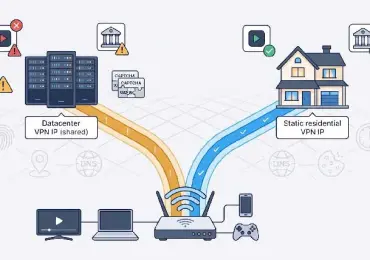
A proxy typically covers one app or browser session. It hides our IP for specific traffic and may help with access, but it does not always encrypt everything.
A VPN routes most or all device traffic through an encrypted tunnel. That makes it a stronger privacy option in many cases.
If we want a quick way to mask our IP in a browser, a proxy can be enough. If we want stronger protection across the whole device, a VPN is usually the better choice.
Setup depends on the service, but the general process is usually straightforward.
Many free proxies work directly in a browser.
Some services offer browser extensions.
If we are using a proxy list, we may need to add the IP address and port manually.
Manual setup gives more control, but it also asks for more caution, especially when the proxy comes from a public list.
The best free proxy depends on what we want to do.
A browser-based proxy like Hide.me, KProxy, ProxySite, or CroxyProxy is usually the easiest path.
A proxy list service like Geonode or Spys.one can help us try different locations, but we need to check each proxy carefully.
We should prioritize providers with a clear privacy policy, secure connections, and a decent reputation.
Free proxies are usually not the right tool. They are too uncertain for important data or personal accounts.
Free proxies can be useful when we want a quick and low-cost way to reduce exposure online. They can hide our IP address, provide a bit of separation from websites, and support basic browsing privacy.
Still, we should be realistic about their limits. Free proxies are often slower, less stable, and less trustworthy than paid alternatives. Some may log data, inject ads, or expose us to risks we would rather avoid.
If we choose carefully and keep our expectations modest, free proxies can still be a practical tool for casual browsing, lightweight testing, and temporary privacy needs.


Discover our other works at the following sites:
Danetsoft is a global web agency headquartered in Indonesia, specializing in web development, managed hosting, and web publishing platform.


 [email protected]
 Magelang, Central Java
 © 2026 Danetsoft. Powered by HTMLy