Publishing audio without visual context is increasingly difficult to justify on modern platforms. YouTube requires something on screen. TikTok, Instagram Reels, and Shorts reward motion. Website landing pages perform better with video or animated media than with static images. Even podcast clips need a visual layer before they can travel on social media. For musicians, AI music creators, marketers, and web publishers, the gap between finished audio and publishable content is a real production problem — and it is exactly the problem that AI Music Visualizer tools are designed to solve.
A good AI Music Visualizer does not just slap a waveform over an audio file. It creates motion, reactive graphics, animated cover-style content, or abstract visual scenes that give audio a watchable form across multiple platforms. This guide covers the tools worth using in 2026, who each one is built for, and how to fit them into a practical content workflow.
Before comparing tools, it helps to be clear about what a visualizer actually is — and what it is not.
A music visualizer creates motion graphics, reactive animations, waveform visuals, abstract scenes, or looping visual content around audio. The output is designed to be fast to produce, reusable across platforms, and useful for a wide range of audio content beyond music.
A full music video involves characters, storytelling, lip-sync, cinematic scenes, and narrative structure. That is a different category of tool with a different production scope.
Many creators — podcasters, brand teams, AI music producers, social media managers — do not need a full music video. They need a visual layer that makes their audio publishable, engaging, and platform-appropriate. That is the visualizer use case.
| Use Case | Best Visual Format | Why It Matters |
|---|---|---|
| Music release | Audio-reactive visualizer | Gives songs a watchable format for YouTube and streaming |
| Podcast clip | Animated waveform or branded background | Makes audio clips social-ready for Reels and Shorts |
| Meditation or ambient track | Slow ambient visual | Supports mood, retention, and session length |
| Brand jingle | Short motion graphic | Useful for ads, landing pages, and social campaigns |
| AI-generated song | Visualizer or animated cover | Makes generated audio easier to publish and share |
| YouTube upload | Full-length visualizer | Gives listeners something to watch across the full track |
| Tool | Best Visualizer Role | Audio Awareness | Customization Level | Best Platform Fit | Overall Score |
|---|---|---|---|---|---|
| Freebeat | Music-aware audio-to-visual workflow | 9/10 | 8/10 | YouTube, TikTok, Reels, Spotify Canvas | 9/10 |
| Neural Frames | Psychedelic abstract experiments | 7/10 | 8/10 | YouTube, niche platforms | 6.5/10 |
| Kaiber | Stylized animated mood loops | 6/10 | 6/10 | TikTok, Reels, short-form | 6/10 |
| Rotor Videos | Template-based release visuals | 5/10 | 5/10 | YouTube, social promos | 5.5/10 |
| Specterr | Waveform and basic visualizer templates | 4/10 | 5/10 | YouTube uploads | 5/10 |
| Renderforest | Branded business templates | 3/10 | 6/10 | Websites, ads, business content | 5/10 |
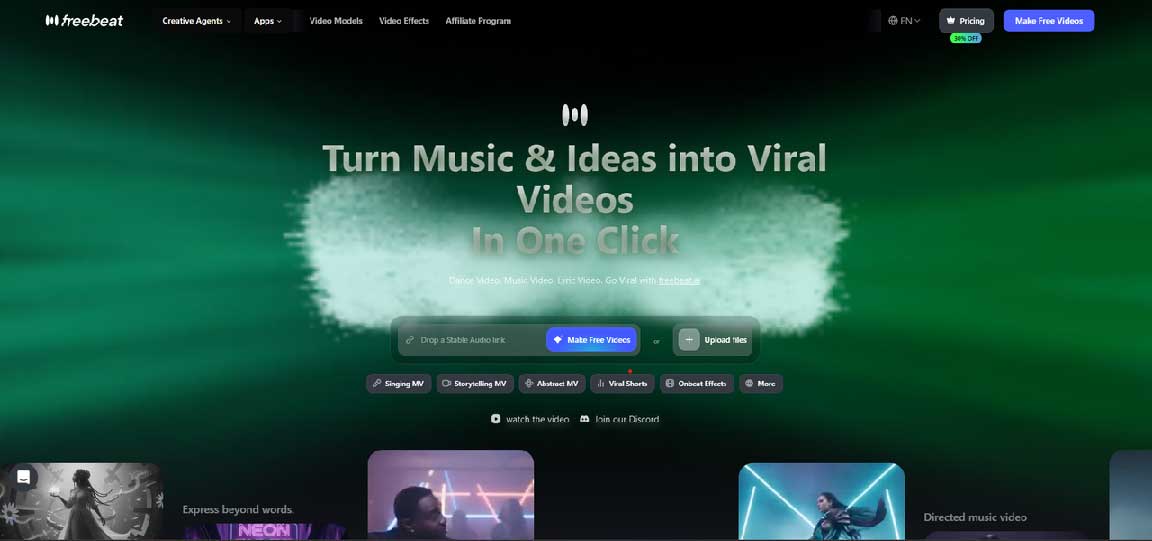
Freebeat is the tool in this category that takes audio-awareness most seriously. It is built around the idea that the audio file itself — its rhythm, energy changes, BPM, and structural sections — should drive the visual output, not the other way around. That starting point separates it from template tools and waveform generators, which treat audio as something to display rather than something to interpret.
The platform analyzes the full track, identifies song sections including verse, chorus, bridge, and outro, and generates visual content where the pacing, energy, and mood shift to match the music. A quiet verse produces slower, more atmospheric visuals. A chorus or drop produces faster motion, denser editing, and stronger visual energy. The result is a visualizer that feels intentional rather than automated.
For creators who need more than a basic waveform, Freebeat works as music visualizer software that turns audio into platform-ready visual content across multiple output formats.
Key features:
Direct audio input from Suno, Udio, YouTube, SoundCloud, TikTok links, or uploaded MP3/WAV/MP4 files — no format conversion required
Beat-aware and rhythm-aware visual generation — visual pacing responds to the actual structure of the track
Abstract Video mode generates flowing, audio-reactive visuals suited to ambient, electronic, and instrumental content
Music Cover Video mode produces looping animated visuals optimized for Spotify Canvas and Apple Music motion visuals
Lyrics Video mode adds beat-synced captions timed precisely to the track — useful for songs, podcast clips, and promotional audio
Multi-format export: 16:9 for YouTube and website embeds, 9:16 for TikTok and Reels, 1:1 for social feeds
Supports full-length tracks up to six minutes and short clips for social-first content
Pricing from $4.99/week with free credits to start
Where it could improve: the platform's strength is in music-driven visual generation, so creators looking for highly branded corporate templates with logo animations may find more specialized options elsewhere.
Neural Frames generates abstract, evolving visuals that respond directly to the frequency content of audio. High, mid, and low frequency bands each drive different visual elements — producing morphing shapes, color fields, and textural animations that pulse and shift with the music.
For ambient producers, electronic artists, and experimental creators, the visual output can be a strong match for the audio's mood and character. The platform offers deep prompt customization, giving creators control over the visual direction at a detailed level.
Key observations:
Genuine frequency-band audio reactivity — more detailed than simple volume-based animation
Output style is abstract by design, which limits use cases outside experimental and atmospheric genres
Not suited for branded content, mainstream visual styles, or creators who need recognizable characters or performers
Better understood as an artistic tool than a general-purpose AI Audio Visualizer for commercial or business use
Kaiber produces stylized animated clips with a painterly, aesthetic quality that has attracted a following among artists who care about visual mood. For short-form content where atmosphere carries the piece — TikTok teasers, animated loop backgrounds, Reels visuals — its output has a distinctive look that stands apart from generic templates.
Audio reactivity responds to general energy levels, which produces results that feel visually alive without deep structural analysis of the track.
Key observations:
Stylized visual output with a signature aesthetic — useful for artists who want a non-generic mood piece
Audio reactivity is energy-based rather than structure-based — does not differentiate between song sections
Better for short clips and loops than for full-length visualizer content
Less suited to business use cases, branded content, or creators who need a structured, repeatable workflow
Rotor Videos has been a reliable option for music promotion content for several years. Its template-based system allows artists and social media managers to upload audio, select a visual template, make basic adjustments, and export a finished visual quickly. Simple release assets, lyric-style videos, and basic promotional clips can be produced without technical knowledge.
Key observations:
Fast end-to-end workflow from audio to exported visual
Template library covers a range of genres and aesthetic styles
Lyric video generation with customizable fonts and timing is a practical feature
Output is template-driven — visuals belong to the template rather than reflecting the audio's specific character
Limited as AI Music Visualizer software in the sense that templates do not adapt intelligently to the audio
Specterr is one of the more straightforward tools in this category, focused specifically on waveform visualizers and basic music video templates. For creators who need a quick, functional visual for a YouTube upload — something that gives listeners something to watch without requiring design skill — it delivers reliably.
Key observations:
Waveform visualizer templates are the core output — clean and functional
Customization options for colors, backgrounds, and text are available but limited in scope
Audio awareness is basic — waveform animation responds to amplitude rather than musical structure
Better suited to static, simple visual needs than to generate visual for song projects that require mood, energy, or structural variation
Less dynamic than AI-driven tools; output looks like a visualizer rather than a visual experience
Renderforest is a broad template platform that covers a wide range of visual content types, including audio visualizers for business and marketing use. For small businesses, web agencies, and marketers who need branded audio content — a logo animation with music, a product explainer with audio, or a simple social clip — it offers a practical toolkit.
Key observations:
Strong branded template library covering business, marketing, and corporate visual styles
Logo animation and intro/outro generation are useful for web publishers and agencies
Audio visualizer output is template-driven with limited music intelligence
Better fit for marketing and business content than for music-native or AI Audio Visualizer workflows
Useful for teams that need visual consistency across brand assets rather than music-aware output
A practical workflow for turning audio into visual content across multiple platforms:
Start with a finished audio file, a streaming link, or an AI-generated track from a platform like Suno or Udio
Decide on the visualizer type: waveform for simple uploads, abstract or ambient visual for mood-driven tracks, animated cover for streaming platforms, or beat-reactive visual for social-first content
Generate the visual using an AI Audio Visualizer that matches the audio's character and the platform's requirements
Export platform-specific versions from the same source file: 16:9 for YouTube and website embeds, 9:16 for TikTok and Reels, 1:1 for Instagram feed posts
Use the full-length version for YouTube and the strongest 15–30 second section for short-form platforms
Repurpose one audio track into multiple visual assets — a full YouTube upload, two or three short clips, and a looping Spotify Canvas version can all come from the same generation session
Using a dedicated tool to generate visual for song projects rather than assembling clips manually in an editor saves significant production time, especially for creators who publish frequently.
Audio content performs significantly better online when paired with motion. A static image or a plain audio player on a website holds attention for far less time than an animated visual. For web publishers and digital marketers, this creates a practical opportunity that is easy to overlook.
Branded audio clips — jingles, intros, event soundbites, product themes — can be turned into short visual assets for landing pages, email embeds, and social campaigns using AI Music Visualizer software. A podcast clip with an animated waveform and branded background travels on Reels and Shorts. A brand theme with a motion graphic overlay works in a YouTube pre-roll or a website hero section.
Small businesses and web agencies can use visualizers as repeatable media assets without hiring video editors for every piece of audio content. Once a visual style is established, the same workflow can be applied across an entire content calendar. For content teams managing multiple clients or channels, that repeatability is a production efficiency that compounds over time.
Freebeat: best for music-aware, audio-first visualizer output and richer visual content across YouTube, TikTok, Reels, and Spotify Canvas
Neural Frames: best for psychedelic and abstract experimental visuals for ambient and electronic audio
Kaiber: best for stylized animated mood loops and short aesthetic clips
Rotor Videos: best for template-based release visuals and simple lyric-style content
Specterr: best for basic waveform visualizers and quick YouTube uploads
Renderforest: best for branded business templates, logo animations, and marketing audio content
The best AI Music Visualizer is not simply the tool that produces the flashiest animation. It is the one that helps creators turn audio into useful, publishable, platform-ready visual content — efficiently and repeatedly.
For creators who need a music-aware workflow that responds to the actual character of the audio, Freebeat offers the strongest overall option in 2026. For more specific needs — abstract experiments, branded templates, basic waveforms — the other tools in this list each serve their niche well. The right choice depends on what the audio needs to become, and which platform it needs to live on.


Discover our other works at the following sites:
Danetsoft is a global web agency headquartered in Indonesia, specializing in web development, managed hosting, and web publishing platform.


 [email protected]
 Magelang, Central Java
 © 2026 Danetsoft. Powered by HTMLy