 Photo by Lukas Blazek on Pexels
Most WordPress problems announce themselves. A fatal error, a white screen, a broken layout after an update. Plugin overlap is different. When two plugins quietly do the same job, the site keeps working, the dashboard stays green and nobody gets an alert. The cost shows up later, in search engines reading conflicting signals that no one on the team knows are there.
WordPress has no concept of "this job is already taken." If an SEO plugin outputs a sitemap and a second plugin also writes one, both run. If the theme, a schema plugin and a header-scripts field all print JSON-LD, the page simply carries all of it. PHP does not complain, the front end renders normally, and the SEO plugin's own checks only look at what the SEO plugin produces.
Agency-managed sites are especially prone to this. Different developers add plugins for specific requests, a page builder brings its own features, and someone pastes a snippet into a header field "just for now." Each decision made sense at the time.
An audit of a roughly 200-page WordPress agency site in October 2026 is a useful example, because the site was in decent shape by most measures. The problems were all in the gaps between plugins.
The SEO plugin's sitemap index listed 205 URLs, all returning 200, none noindexed. A second plugin also ran a daily job that wrote a static /sitemap.xml file to the web root. That file listed 214 URLs, including 12 page-builder template URLs that redirected to the home page and 1 noindexed page, and it was missing the 4 newest pages.
Because a physical file in the web root is served before WordPress handles the request, anything that requested /sitemap.xml got the stale list. The fix was to switch off the second plugin's sitemap job using its own setting rather than deleting the plugin, remove the file, and redirect /sitemap.xml to the main sitemap index.
This was the largest finding. In total, 41 pages had FAQPage or Service JSON-LD pasted into a header-scripts plugin field at some point in the past. The visible content had moved on since then, and on many of those pages the SEO plugin was now printing its own FAQ markup as well.
The cleanup modified 18 of those pages. The biggest group was 15 service pages where the hard-coded FAQ duplicated the FAQ the SEO plugin was already printing. On 14 of the 15, the hard-coded questions no longer matched the visible FAQ at all, with anywhere from 0 of 5 to 0 of 11 questions actually on the page. On the fifteenth, the questions still matched, but both the FAQ and the Service markup were output twice.
The other three were one-offs. The About page carried a stale FAQ with 0 of 8 questions visible, plus a duplicate breadcrumb. One blog post had the same pairing of a stale FAQ and a second breadcrumb, and one more service page had a duplicate Service node.
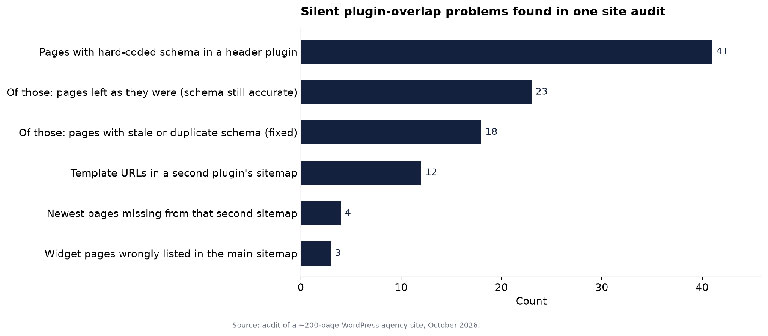 Figure 1: Structured data audit findings: pages with hard-coded schema, pages changed and pages left untouched.
On those 18 pages, the stale FAQs and duplicate nodes came out, while other schema types such as Organization and AboutPage stayed. The remaining 23 pages were left alone, because the hard-coded FAQ was their only FAQ and every one of its questions was visible. After the fix, every page carried exactly one FAQPage with all questions visible, and no more than one Service node.
The rule was simple: delete markup that describes content the visitor cannot see, keep markup that is accurate and unduplicated.
One page still showed a duplicate FAQ after the cleanup. The source was a forgotten must-use plugin in wp-content/mu-plugins. Must-use plugins load automatically, do not appear in the main Plugins list, and cannot be deactivated from the admin screen, which makes them easy to forget. It was disabled.
A status-code test of 12 URL patterns passed 10. The two failures were easy to miss. Made-up page numbers such as /blog/page/999/ returned 200 and were indexable, which hands crawlers an endless supply of duplicate archive URLs. The fix stopped those URLs answering 200: they were set to return 404 and then redirected to the base page. The second failure was the 404 page itself, which showed a single line of default theme text with no search box or links. A custom 404 page replaced it, still returning a true 404 status.
The same audit also found plain tables and code blocks in blog posts pushing pages to 466px or 529px wide on 360 to 375px phone screens. That is a CSS issue rather than plugin overlap, and like the others it only shows up when someone goes looking.
If you maintain client sites and want a second opinion on this kind of cleanup, WordPress SEO specialists who audit plugin stacks as well as content can save your developers hours of tracing where each script or sitemap comes from.
A terminal and a browser cover the first pass.
Status codes. Check how the site answers URLs that should not exist:
curl -s -o /dev/null -w "%{http_code}n" https://example.com/blog/page/999/
curl -s -o /dev/null -w "%{http_code}n" https://example.com/this-page-does-not-exist/
curl -sI https://example.com/Services/ | grep -iE "^(HTTP|location)"
The first two should not return 200. The third should show a 301 to the lowercase URL.
Sitemaps. Request /sitemap.xml, /sitemap_index.xml and /wp-sitemap.xml. If they return different lists, more than one generator is active. Check the web root over SFTP for a physical sitemap.xml file.
JSON-LD count. Open view-source on a page with an FAQ and search for application/ld+json. Or count FAQPage blocks from the command line:
curl -s https://example.com/about/ | grep -oE '"@type"s*:s*"FAQPage"' | wc -l
Anything above 1 needs a look. Then compare each question in the markup against the visible page. Google's structured data guidelines say markup should describe content that readers can actually see on the page, so a hard-coded FAQ that no longer matches the visible one is exactly what to remove.
Hidden plugins. List wp-content/mu-plugins and check for header and footer script fields in plugins and the theme.
| SEO job | Where duplicates usually hide | Quick check |
|---|---|---|
| XML sitemap | Page builders, caching, security and backup plugins; static files in the web root | Compare /sitemap.xml with the SEO plugin's index |
| Structured data | Theme, schema plugins, header-scripts fields, mu-plugins | Count JSON-LD blocks by @type per page |
| Breadcrumbs | Theme plus SEO plugin both outputting BreadcrumbList | Search source for BreadcrumbList |
| Canonical and meta robots | Two SEO plugins active after a migration | Search source for rel="canonical" count |
| Redirects | SEO plugin, redirect plugin, server rules | curl -sI and follow the chain |
| 404 handling | Theme template versus plugin "redirect all 404s" settings | Request a made-up URL and check the status |
Pick one job from the table each month and assign it a single owner plugin. Turn the feature off everywhere else using each plugin's own settings, so updates do not switch it back on. Run the curl checks before and after, save the output in the client's change log, and add a mu-plugins review to your onboarding for every inherited site. It stops the next round of silent duplicates before it starts.


Discover our other works at the following sites:
Danetsoft is a global web agency headquartered in Indonesia, specializing in web development, managed hosting, and web publishing platform.


 [email protected]
 Magelang, Central Java
 © 2026 Danetsoft. Powered by HTMLy