Seven product photos are all Ivy has for her next Amazon listing video. In this fictional seller example, her collapsible silicone lunch box keeps prompting the same buyer question: how thin is it when folded? With no budget for a new shoot, she needs to see which photos answer it.
She starts by opening the photos and checking what each one actually proves. She will choose the question, arrange the evidence, build shots from approved images, verify the details, and check the intended placement before publishing. A generated folding motion cannot substitute for an observed product action.
Write the buyer's question above the shot plan: "How thin is it when folded?" Ivy needs the folded state and a verified measurement, not an introduction to every feature of the lunch box.
Choose a question from feedback you can actually review, such as product reviews or customer inquiries. Check whether the material you have can answer it. If it cannot, identify the missing evidence before editing. A confident caption does not fill that gap.
Leave unrelated features for another video. Use this question to decide which photos deserve a place.
Review the seven images and mark what each shows. Keep the approved originals separate from working copies. Select views for a simple sequence: introduce the lunch box, compare its documented states, then explain the folded size.
| Planned shot | Source needed | What to verify |
|---|---|---|
| Expanded product | Approved expanded-state photo | Correct item and variant |
| State comparison | Real expanded and folded photos | Both depict the same product |
| Folded size | Approved size image and specification | Number, unit, and measured direction |
This is a selection plan, not an inventory of what Ivy's folder contains. A real folded-state image is required to establish folded height; check whether the set contains one. Choose a question the images do answer or obtain the missing real material.
For a product video from images, give each selected image one visual job. The Amazon product video maker workflow article offers a reference for organizing approved product inputs, checking shots, and preparing for the intended placement. Use it as production guidance; any claim that a tool can infer Ivy's folding mechanism or handle publication for her needs separate verification.
Start with a held photo, a restrained crop, or a slow move within the source image. Let viewers inspect the lunch box before changing the shot. An ordinary editor can assemble this sequence without generating new product geometry.
If you try generated movement, compare its selected frames with the original. Check the edges, lid, color, and visible accessories. Discard a move that changes the product. A smooth result still needs that comparison.
Place the real expanded-state photo first, then the real folded-state photo. Label each state and use a simple transition between them. The viewer sees the two documented conditions; the movement between them remains unshown.
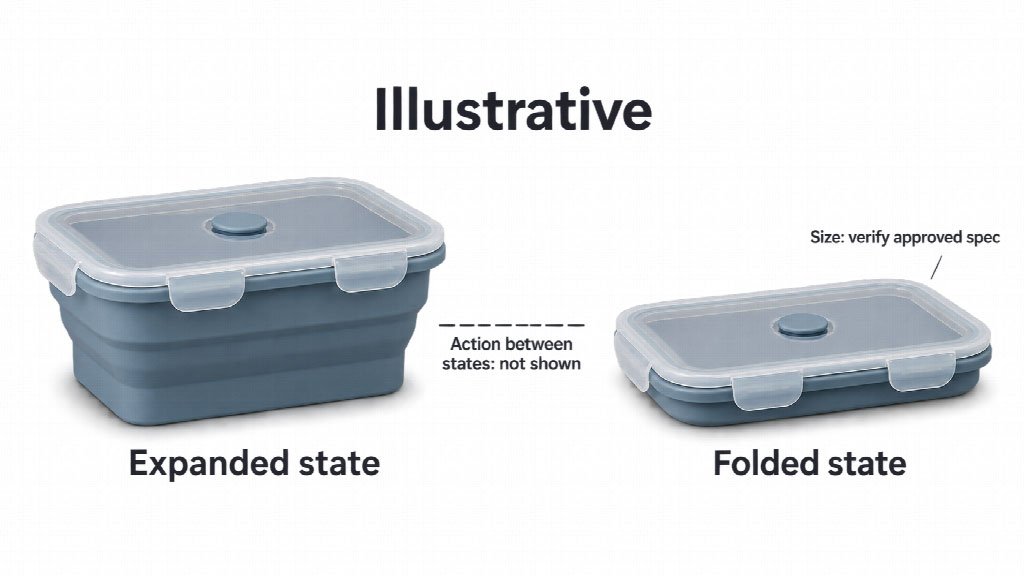 Expanded and folded views show only two states. A continuous folding action needs real action material, and folded size must be checked against approved specifications.
For a continuous folding demonstration, obtain real action material that you can check against the item. Do not ask a generator to invent the intermediate movement from the endpoints. If that evidence is unavailable, keep the still-image sequence. Hold on the documented folded-state photo long enough for the viewer to compare it with the expanded view.
Review the draft beside the approved photos, current product details, and verified dimension records. Inspect each shot before choosing an export. Ivy's buyer needs accurate information about a specific item, so an attractive picture of a similar lunch box is insufficient.
Check the folding edges, lid, material, color, and accessories throughout the retained footage. Look at the transitions too. A lid that changes between shots or a different variant in the folded view breaks the comparison.
Remove any intermediate action that lacks a real reference. Software can organize the files, but someone familiar with the product must judge whether the sequence represents it accurately. Keep the source filename beside each planned shot so that the reviewer can trace it back.
Read every dimension and label against the approved specification. Match the unit and the direction being measured. A height label placed beside a width arrow gives the wrong explanation even if the number itself is copied correctly.
Add verified labels manually in an editor when necessary. Keep them separate from any generated movement, then inspect the final rendered text. Never treat a number a model produces as a measurement.
Check that the illustration and words refer to the same state. A folded-height label belongs with the documented folded item. If a source diagram is unclear, resolve that uncertainty before including it. Do not invent a dimension to finish the layout.
For this e-commerce product video, confirm that the destination is the product detail page. Before final export, use your own Seller Central to check the current requirements for the marketplace, account, and intended placement. Follow the applicable instructions there instead of borrowing specifications from an unrelated video example.
Review the actual product identifier and variant associated with the material. Check that the wording agrees with the product page and that the folded state remains understandable in the available preview. Remove any unsupported action or product claim found during this review.
After submitting, inspect the status and the actual presentation available to you. A completed upload does not establish approval or tell you exactly where buyers will see it. The number of photos in Ivy's folder provides no assurance about video placement either.
Keep the exported file and its source record together. If the presentation needs correction, those records let you locate the affected shot without rebuilding the whole sequence.
If the video is published, Ivy can observe whether the same thickness question continues to appear in feedback she can access. Save the original wording of useful comments or inquiries and note when they were received. Record any simultaneous changes to the listing or its images.
A change in question frequency alone would not establish that the video caused it. Review what people still misunderstand. A question about the folded state calls for a different edit from confusion about which measurement the diagram shows.
In this hypothetical workflow, Ivy prepares to review those questions after publication. For your next video, choose one recurring question from your product's real feedback and identify the existing image that can help answer it.


Discover our other works at the following sites:
Danetsoft is a global web agency headquartered in Indonesia, specializing in web development, managed hosting, and web publishing platform.


 [email protected]
 Magelang, Central Java
 © 2026 Danetsoft. Powered by HTMLy