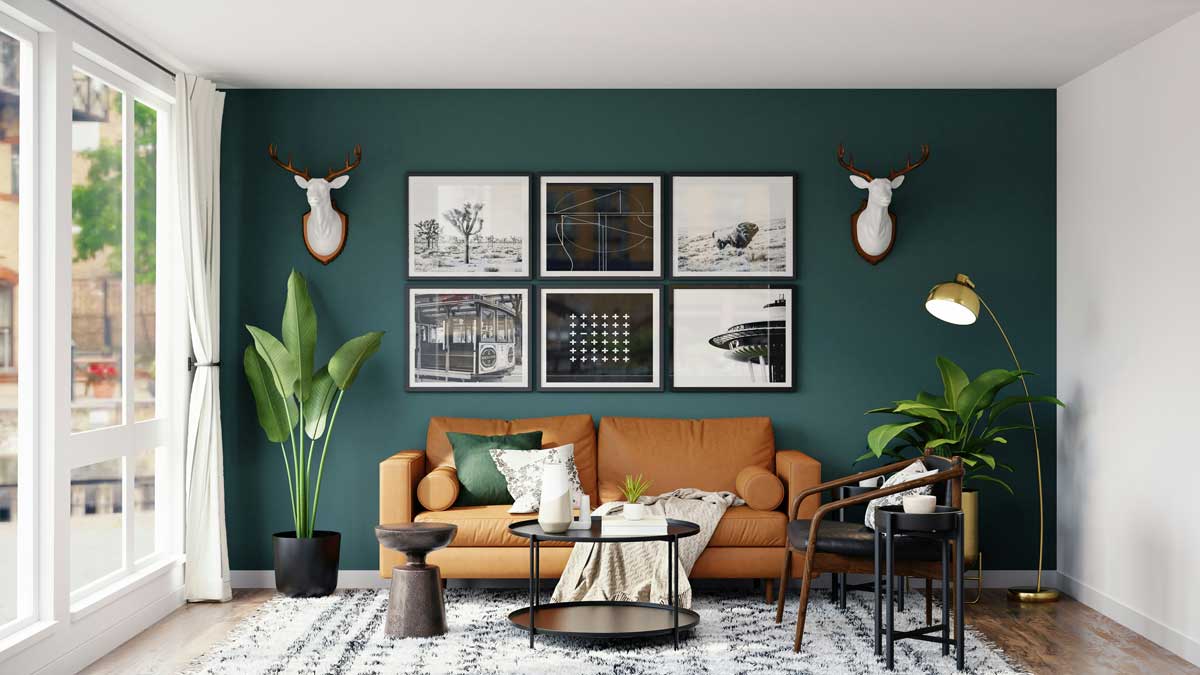
 Photo by Spacejoy on Unsplash
A few years ago, planning a room makeover usually meant collecting magazine clippings, making rough sketches, and hoping the final result would somehow come together. We would save photos of sofas, paint colors, and lighting ideas, then try to imagine how they might look in our own space. That process often took a lot of time, and it still left plenty of room for mistakes.
Now, AI home design free tools are making that process much easier. We can upload a room photo, test different styles, and explore layouts without paying for expensive software or hiring a designer. What used to feel like guesswork is turning into something much more visual and manageable.
This does not mean design has become less creative. In many ways, it has become more open. With smart AI room design, we can experiment faster, compare more ideas, and make choices with greater confidence. For renters, homeowners, students, and anyone working with a real budget, that matters.
When people talk about AI home design free tools, they usually mean online platforms or apps that use artificial intelligence to help us plan interiors. These tools can look at a photo of a room and suggest changes based on style, layout, or function.
Some can generate a new version of the room in a chosen style, such as modern, Scandinavian, industrial, or boho. Others help with furniture placement, color matching, or room visualization. A few even combine all of these features in one place.
The free part is important because it lowers the barrier to entry. Not everyone wants to pay for advanced design software just to see whether a wall color or sofa arrangement works. Free tools let us test ideas first, which makes the whole process feel safer and more approachable.
The growing interest in smart AI room design is easy to understand once we look at the everyday problems it solves.
Traditional decorating can be slow. We might spend days looking for ideas, comparing furniture sizes, and figuring out what fits. AI cuts down that waiting time by generating suggestions quickly.
A room involves a lot of choices, flooring, color, shape, texture, lighting, storage, and furniture. That much decision-making can feel draining. AI helps narrow the field so we are not overwhelmed by endless possibilities.
One of the hardest parts of decorating is imagining how everything will look together before we buy it. AI tools create visual previews that make it easier to understand proportions, tones, and balance.
Not every room needs a complete renovation. Sometimes we just want to improve what we already have. Free AI design tools are especially useful for low-cost updates, because they help us make thoughtful changes without a big investment.
Most AI room design platforms follow a simple process. We upload an image, choose a style or goal, and let the system generate suggestions. Behind the scenes, the tool studies the room and tries to recognize major elements like walls, windows, doors, and furniture.
If we upload a clear photo, the tool can analyze the layout and create an updated version of the space. This works well when we want to reimagine a living room, bedroom, office, or dining area.
Many tools let us choose a design style. That might include minimalist, rustic, modern, luxury, contemporary, or cozy. Once we pick a direction, the AI adapts the room to match it.
Some platforms are more practical and focus on arrangement. They help us decide where to place furniture so the room feels open, balanced, and easy to move through.
The most useful part for many of us is the finished image. AI can show a polished version of the room, which gives us a stronger sense of what works and what does not.
There are several reasons these tools are becoming part of everyday home planning.
Many of these platforms are built for regular users, not professionals. We do not need special training or advanced design knowledge to get started.
Sometimes we know something feels off in a room, but we cannot put our finger on why. AI can offer fresh ideas that help us see the space differently.
Buying furniture, rugs, or paint before seeing how they fit together can lead to regret later. AI previews can help us avoid those missteps.
Room design can seem like a serious task, especially when we want everything to match. AI makes it feel more playful and experimental, which often leads to better results.
Even the best AI room design tools have limits. They are helpful, but they do not understand a home the way the people living in it do.
Rooms often have strange corners, uneven walls, old fixtures, or awkward storage needs. AI can struggle with these details. Human planning is still needed to handle real-life quirks.
A room should reflect the people who use it. AI may suggest a popular look, but that does not always mean it fits our personality, habits, or memories.
A beautiful room is not much use if it does not support daily life. Families, pet owners, remote workers, and people with mobility needs all require different things from a space.
Some free tools create convincing images, while others produce odd proportions, unrealistic lighting, or strange furniture placement. It helps to treat the output as a starting point, not a final answer.
These tools are not limited to one kind of room. They can help across the whole home.
Living rooms are often where we gather, relax, and entertain. AI can help us figure out seating layouts, focal points, and ways to make the space feel welcoming.
In bedrooms, the focus is often comfort and calm. AI can suggest restful colors, better bed placement, and furniture arrangements that make the room feel more open.
Kitchen design is about both flow and efficiency. AI can help us think through cabinet arrangement, countertop space, and the placement of islands or tables.
With more people working from home, office design matters more than ever. AI can help create a workspace that supports focus, storage, and good lighting.
Smaller rooms can be tricky because every inch matters. AI is especially useful here, since it can suggest compact furniture, multi-use layouts, and ways to reduce visual clutter.
A lot of interior design content focuses on large homes, expensive furniture, and full professional makeovers. That is not the reality for most of us. We are usually working with limited budgets, mixed furniture, and spaces that need to be improved step by step.
This is where AI home design free tools really shine. They give us access to design support without making the process feel exclusive. We can test ideas before painting a wall. We can compare sofa sizes before ordering. We can explore different moods without hiring anyone.
For renters, this matters even more. When we cannot make permanent changes, AI helps us find practical updates that improve the room without risking damage or wasted money.
AI design tools are often trained on large collections of images, which means they tend to echo what is popular right now. That can be useful if we want a space that feels current.
Some of the most common styles these tools produce include:
These styles can be a strong starting point, but we do not have to follow them exactly. The best rooms often mix influences in a way that feels honest and lived in.
One of the more practical uses of smart AI room design is catching problems before we commit to them.
Rooms can quickly feel crowded when we try to fit in too many pieces. AI helps us see when a layout is becoming too tight.
A large sectional in a small room, or a tiny rug under a large sofa, can throw off the whole space. AI visuals make these issues easier to notice.
It is easy to fall in love with individual items and forget to think about how they look as a group. AI helps us compare color combinations before we buy.
We need to move through a room without bumping into things. AI can reveal where a layout blocks pathways or creates awkward movement.
The tools we have now are already useful, but the future looks even more interesting.
Future AI systems will likely learn more about our routines and preferences. That could lead to recommendations that feel less generic and more tailored to how we live.
It may become easier to move from design idea to actual purchase. If we like a room concept, the tool could help us find similar furniture, paint colors, and decor items right away.
Some AI-generated interiors still look too polished or slightly artificial. As the technology improves, the previews will likely feel closer to real life.
We may also see better ways to share room concepts with partners, roommates, or contractors. That could make planning smoother and reduce confusion later.
To make the most of AI home design free platforms, it helps to start with a good input. A bright, clear photo usually works better than a dark or cluttered one. If possible, we should remove extra objects so the room is easier for the tool to read.
It also helps to be specific about what we want. A general request for a “nice room” may produce vague results, while a clearer goal like “cozy reading space with warm neutrals” gives the tool a stronger direction.
Trying multiple versions is another smart move. One design may feel too plain, while another feels too busy. Side-by-side comparisons often help us decide what suits the space best.
Most of all, we should remember that AI is a helper, not the final authority. The room needs to support our habits, our budget, and our daily routines.
AI home design free tools are changing the way we think about rooms. They make design faster, more accessible, and less stressful. They help us explore ideas, avoid obvious mistakes, and visualize changes before spending money.
Smart AI room design does not replace creativity, it gives it more room to work. It lets us test styles, compare layouts, and build spaces that feel more personal and practical. As these tools continue to improve, they will likely become a regular part of how we plan and style our homes, not just for appearance, but for the way we actually live.


Discover our other works at the following sites:
Danetsoft is a global web agency headquartered in Indonesia, specializing in web development, managed hosting, and web publishing platform.


 [email protected]
 Magelang, Central Java
 © 2026 Danetsoft. Powered by HTMLy